AudioData
AudioData is the class used by WebCodecs to represent raw audio information.
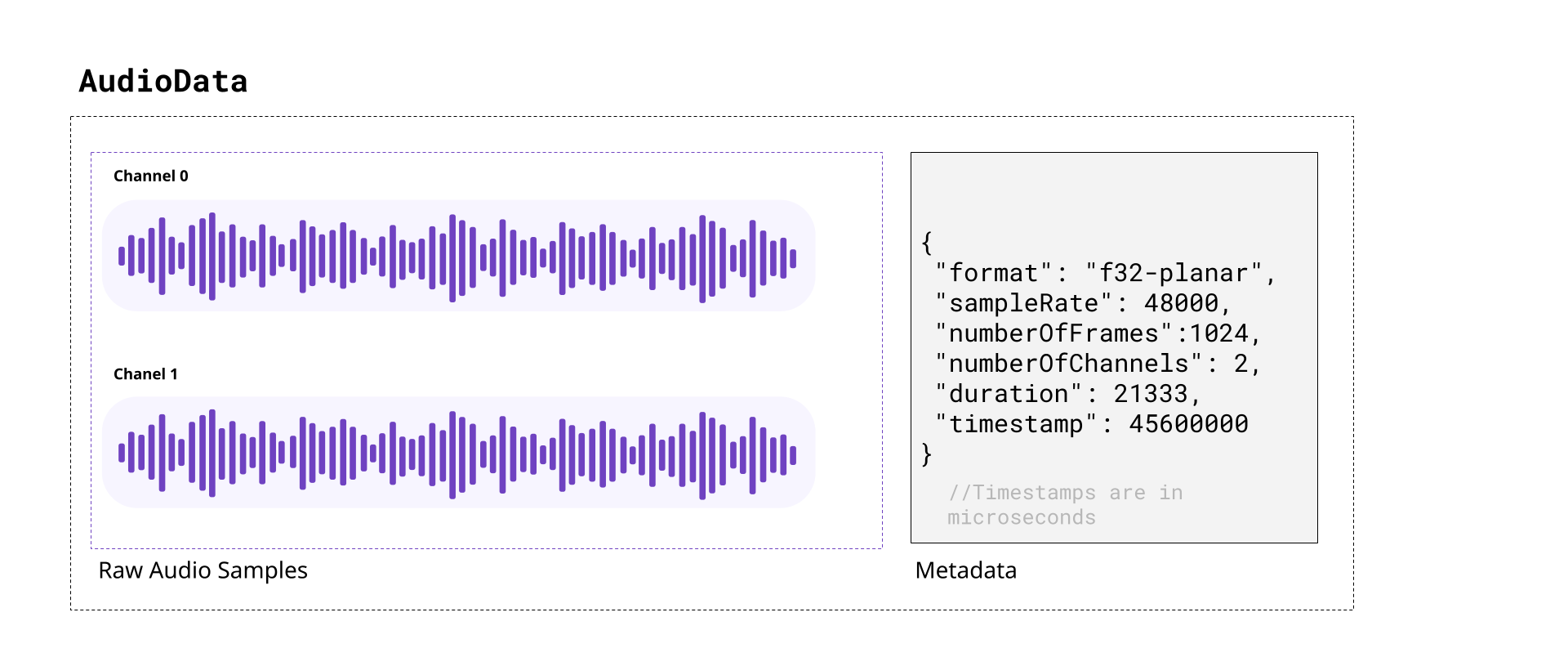
When decoding audio from an audio track in WebCodecs, the decoder will provide AudioData objects, with each AudioData object typically representing less than 0.5 seconds of audio.
Likewise, you’d need to feed raw audio in the form of AudioData to an AudioEncoder in order to encode audio to write into a destination video file or stream.
In this section we’ll cover the basics of audio, and how to read and understand raw data from AudioData objects, how to manipulate raw audio samples and how to write them to AudioData objects.
A quick review of audio
Section titled “A quick review of audio”As you might be aware, sound is made of pressure waves in air, and when sound reaches a human ear or microphone, it vibrates a membrane back and forth. If you plotted this vibration over time, you’d get something that looks like this:
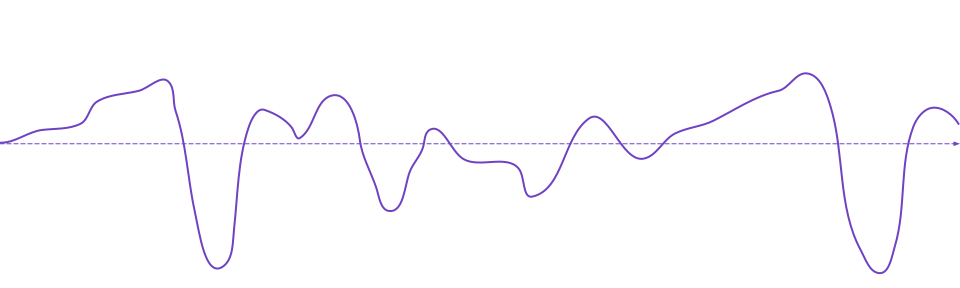
If you’ve heard of the term “sound wave” or “audio signal” or “audio waveform”, that’s what this is. The vibrating membrane in our ear is converted to an electrical signal which our brain interprets as music, or speech or dogs barking, or whatever the sound is, which is how we “hear” things.
Digital Audio
Section titled “Digital Audio”When a microphone records sound, it measures this vibration ~ 44,000 times per second, producing a digital audio signal that looks like this:
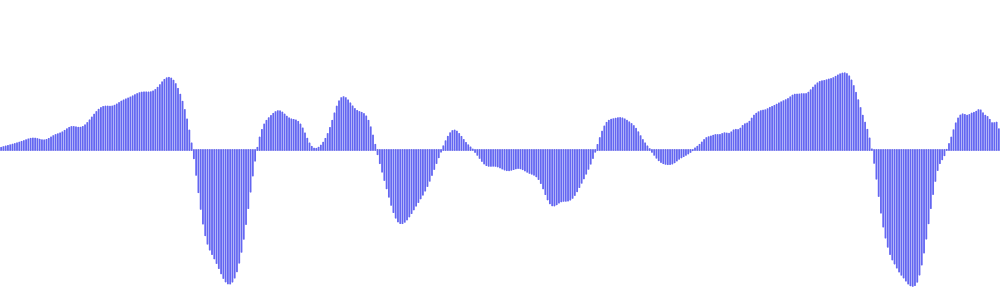
Where, for every second of audio, you have around ~44,000 float32 numbers ranging from -1.0000 to 1.0000.
Each one of these float32 numbers is called an audio sample, and the number of samples per second is called the sample rate. The most typical value for sample rate is 44,100, which was chosen from the limits of human hearing.
Speakers or headphones do the reverse, they move a membrane according to this digital audio signal, recreating pressure waves that our ears can listen to and interpret as the original sound.
Stereo vs mono
Section titled “Stereo vs mono”Humans typically have 2 ears [citation needed], and our brains can interpret slight differences in sound coming in each ear to “hear” where a sound is coming from.
Most software and hardware that deal with digital audio are therefore built to support two audio signals, which we call “channels”.
Audio tracks with just one channel are called mono, and audio tracks with two channels are called stereo. In stereo audio, you might see the two channels referred to as left and right channels, and stereo audio is the default.
Digital music or movies will often have slightly different signals in each channel for an immersive effect. Here’s an example from Big Buck Bunny, where there’s a sound effect created by two objects hitting a tree on the left side of the screen:
You can see this in the actual audio data, by noticing that the left channel has this sound effect and right channel doesn’t.
| Left Channel | Right Channel |
|---|---|
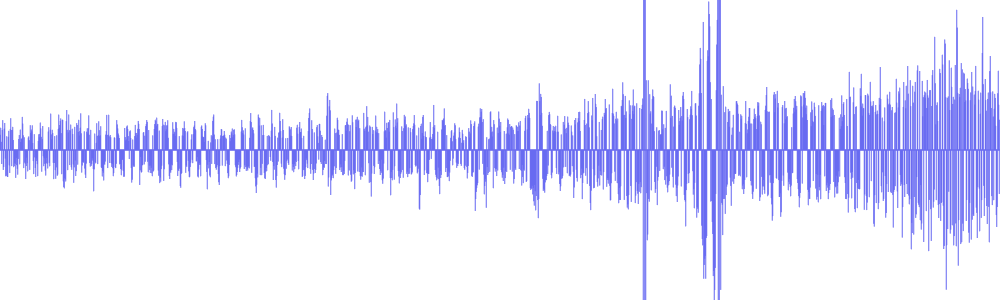 | 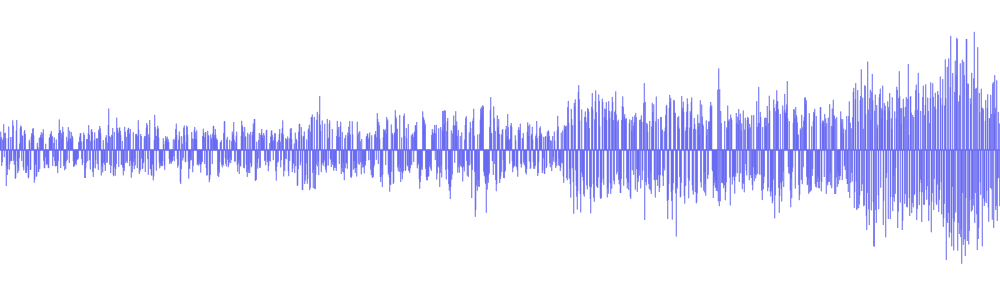 |
Practically speaking, plan to work with two audio channels by default, though some audio files will only have one channel.
Audio Size
Section titled “Audio Size”Raw audio is more compact than raw video, but it’s still pretty big. Per second of audio in a typical file, you’d have:
44,100 samples/sec × 2 channels × 4 bytes = 352,800 bytes = ~344 KBThis equates to ~1.27GB of memory for an hour of typical audio. Audio is entirely on the CPU, so there’s no need to worry about video memory, but it’s still a lot of memory for a single application.
At 128kbps (the most common bitrate for compressed audio), an hour of compressed audio would only take ~58MB.
Practically speaking, we still do need to manage memory, and decode audio in chunks, though audio is more lenient. Whereas just 10 seconds of raw video might be enough to crash your application, you could typically store 10 minutes of raw stereo audio in memory without worrying about crashes.
Audio Data objects
Section titled “Audio Data objects”The AudioData class uses two WebCodecs specific terms:
frames: This another way of saying samples, and each AudioData object will have a property called numberOfFrames (e.g. data.numberOfFrames) which just means, if you extract each channel as a Float32Array, each array will have length numberOfFrames.
planes: This is another way of saying channels. An AudioData object with 2 channels will have 2 ‘planes’.
When you decode audio with WebCodecs, you will get an array of AudioData objects, each usually representing ~0.2 to 0.5 seconds of audio, with the following properties:
format: This is usually f32-planar, meaning each channel is cleanly stored as Float32 samples its own array. If it is f32, samples are float32 but interleaved in one big array. You almost never see data in other formats, but there are other formats
sampleRate: The sample rate
numberOfFrames: Number of samples (per channel)
numberOfChannels: Number of channels
timestamp: Timestamp in the audio track, in microseconds
duration: The duration of the audio data, in microseconds
How to read audio data
Section titled “How to read audio data”To read AudioData samples as Float32Arrays, you would create a Float32Array for each channel, and then use the copyTo method.
f32-planar
Section titled “f32-planar”If the AudioData has the f32-planar format, you just directly copy each channel into its array using planeIndex:
const decodedAudio = <AudioData[]> decodeAudio(encoded_audio);
for(const audioData of decodedAudio){
    const primary_left = new Float32Array(audioData.numberOfFrames);    const primary_right = new Float32Array(audioData.numberOfFrames);
audioData.copyTo(primary_left, {frameOffset: 0, planeIndex: 0}); audioData.copyTo(primary_right, {frameOffset: 0, planeIndex: 1});}If instead it is f32, you would still create buffers, but now you would have to de-interleave the data.
const decodedAudio = <AudioData[]> decodeAudio(encoded_audio);
for(const audioData of decodedAudio){    const interleavedData = new Float32Array(audioData.numberOfFrames * audioData.numberOfChannels);    audioData.copyTo(interleavedData, {frameOffset: 0});
    // Deinterleave: separate channels from [L, R, L, R, L, R, ...]    const primary_left = new Float32Array(audioData.numberOfFrames);    const primary_right = new Float32Array(audioData.numberOfFrames);
    for(let i = 0; i < audioData.numberOfFrames; i++){        primary_left[i] = interleavedData[i * 2];     // Even indices = left        primary_right[i] = interleavedData[i * 2 + 1]; // Odd indices = right    }}
Generic reader
Section titled “Generic reader”You can use a general function like this one to return data for either case:
function extractChannels(audioData: AudioData): Float32Array[] {    const channels: Float32Array[] = [];
    if (audioData.format.includes('planar')) {        // Planar format: one plane per channel        for (let i = 0; i < audioData.numberOfChannels; i++) {            const channelData = new Float32Array(audioData.numberOfFrames);            audioData.copyTo(channelData, { frameOffset: 0, planeIndex: i });            channels.push(channelData);        }    } else {        // Interleaved format: all channels in one buffer        const interleavedData = new Float32Array(            audioData.numberOfFrames * audioData.numberOfChannels        );        audioData.copyTo(interleavedData, { frameOffset: 0 });
        // Deinterleave channels        for (let ch = 0; ch < audioData.numberOfChannels; ch++) {            const channelData = new Float32Array(audioData.numberOfFrames);            for (let i = 0; i < audioData.numberOfFrames; i++) {                channelData[i] = interleavedData[i * audioData.numberOfChannels + ch];            }            channels.push(channelData);        }    }
    return channels;}
Which is also available via webcodecs-utils
import {extractChannels} from 'webcodecs-utils'And then you’d extract channels as so:
const decodedAudio = <AudioData[]> decodeAudio(encoded_audio);
for (const audioData of decodedAudio) {    const channels =  <Float32Arrray[]>  extractChannels(audioData);    const primary_left = channels[0];    const primary_right = channels[1]; // if it exists}
Manipulating audio data
Section titled “Manipulating audio data”Once you have audio data as Float32Arrays, you can arbitrarily manipulate data. Manipulating audio data can be compute intensive, so you’d ideally do all of this in a worker thread, potentially with libraries using web assembly to accelerate computation.
For simplicity, I’ll just a couple of basic manipulations I’ve used in my actual video editing application used in the video rendering process. These functions are implemented in Javascript, mostly because the audio computation is negligible compared to the computation involved in video encoding.
Scaling audio
Section titled “Scaling audio”Perhaps the simplest operation is just to scale audio data (adjusting the volume)
const SCALING_FACTOR=2;
const decodedAudio = <AudioData[]> decodeAudio(encoded_audio);
for (const audioData of decodedAudio) {    const channels = <Float32Arrray[]> extractChannels(audioData);
    for (const channel of channels){        const scaled = new Float32Array(channel.length);
        for(let i=0; i < channel.length; i++){            scaled[i] = channel[i]*SCALING_FACTOR        }        //Do something with scaled    }}
Mixing audio
Section titled “Mixing audio”You can also mix two audio sources together. Here’s how you’d create a fade transition between two audio sources:
const fromAudio = <AudioData[]> decodeAudio(from_audio_encoded);const toAudio = <AudioData[]> decodeAudio(to_audio_encoded);
const num_chunks = Math.min(fromAudio.length, toAudio.length);

const fade_in = fromAudio.slice(0, num_chunks);const fade_out = toAudio.slice(0, num_chunks);

const mixed_chunks: AudioData[] = [];
for(let i=0; i<num_chunks; i++){

    const source_chunk = fade_in[i];    const target_chunk = fade_out[i];
    // Assuming f32-planar, 2 channels    const source_left = new Float32Array(source_chunk.numberOfFrames);    const source_right = new Float32Array(source_chunk.numberOfFrames);    const target_left = new Float32Array(target_chunk.numberOfFrames);    const target_right = new Float32Array(target_chunk.numberOfFrames);
    source_chunk.copyTo(source_left, {frameOffset: 0, planeIndex: 0});    source_chunk.copyTo(source_right, {frameOffset: 0, planeIndex: 1});    target_chunk.copyTo(target_left, {frameOffset: 0, planeIndex: 0});    target_chunk.copyTo(target_right, {frameOffset: 0, planeIndex: 1});

    const mixed_left = new Float32Array(source_left.length);    const mixed_right = new Float32Array(source_right.length);
    for(let j=0; j<source_left.length; j++){        mixed_left[j] = source_left[j] + target_left[j];    }
    for(let j=0; j<source_right.length; j++){        mixed_right[j] = source_right[j] + target_right[j];    }    //Do something with mixed channels}
Resampling
Section titled “Resampling”Finally, you can also resample raw audio in javascript, as so:
async function resample(audio: AudioData[], target_sample_rate: number){
    const source_sample_rate = audio[0].sampleRate;    const num_source_channels = audio[0].numberOfChannels;    const num_target_channels = audio[0].numberOfChannels
    const ratio = target_sample_rate/source_sample_rate;
    const target_data_chunks: AudioData[] = [];
    let total_frames = 0;    let frame_offset = 0;

    for(const frame of audio){        total_frames += frame.numberOfFrames;    }
    const start_timestamp = audio[0].timestamp;    const source_audio = new Float32Array(total_frames*num_target_channels);    const num_target_frames = Math.floor(total_frames*ratio);    const target_data = new Float32Array(num_target_frames*num_target_channels);    const num_target_audio_chunks = Math.floor(target_data.length/(1024*num_target_channels));
    for(let channel=0; channel<num_target_channels; channel++){        for(const frame of audio){            const data_view = new DataView(source_audio.buffer, frame_offset*4, frame.numberOfFrames*4);            frame.copyTo(data_view, {frameOffset: 0, planeIndex: channel});            frame_offset += frame.numberOfFrames;        }    }
    for(let i=0; i<num_target_frames*num_target_channels; i++){        const inputIndex = i / ratio;        const index1 = Math.floor(inputIndex);        const index2 = Math.min(index1 + 1, source_audio.length - 1);        const fraction = inputIndex - index1;        target_data[i] = source_audio[index1] + fraction * (source_audio[index2] - source_audio[index1]);    }
    const left_channel = target_data.subarray(0, num_target_frames);    const right_channel = target_data.subarray(num_target_frames, num_target_frames*2);}
How to write audio data
Section titled “How to write audio data”To write audio data, you’d need to use AudioData constructor, format the input data as a Float32Array, and then specify the relevant metadata.
Mixing audio
Section titled “Mixing audio”For example, let’s go back to the audio mixing example:
const mixed_left: Float32Array = //obtained previously;const mixed_right: Float32Array = //obtained previously
const mixed_stereo = new Float32Array(mixed_left.length*2);mixed_stereo.set(mixed_left, 0);mixed_stereo.set(mixed_right, mixed_left.length);
const mixed_chunk = new AudioData({    numberOfFrames: 1024,    numberOfChannels: 2,    data: mixed_stereo,    format: "f32-planar",    sampleRate: source_chunk.sampleRate,    timestamp: source_chunk.timestamp})
You create the destination data as a single Float32Array with a length of num_frames*num_channels, and then place each channels data into the target array at position channel_index*num_frames.
Here’s the full working example:
function mixAudio(fromAudio: AudioData[], toAudio: AudioData[]): AudioData[]{
    const num_chunks = Math.min(fromAudio.length, toAudio.length);    const fade_in = fromAudio.slice(0, num_chunks);    const fade_out = toAudio.slice(0, num_chunks);    const mixed_chunks: AudioData[] = [];
    for(let i=0; i<num_chunks; i++){
        const source_chunk = fade_in[i];        const target_chunk = fade_out[i];
        // Assuming f32-planar, 2 channels        const source_left = new Float32Array(source_chunk.numberOfFrames);        const source_right = new Float32Array(source_chunk.numberOfFrames);        const target_left = new Float32Array(target_chunk.numberOfFrames);        const target_right = new Float32Array(target_chunk.numberOfFrames);
        source_chunk.copyTo(source_left, {frameOffset: 0, planeIndex: 0});        source_chunk.copyTo(source_right, {frameOffset: 0, planeIndex: 1});        target_chunk.copyTo(target_left, {frameOffset: 0, planeIndex: 0});        target_chunk.copyTo(target_right, {frameOffset: 0, planeIndex: 1});

        const mixed_left = new Float32Array(source_left.length);        const mixed_right = new Float32Array(source_right.length);
        for(let j=0; j<source_left.length; j++){            mixed_left[j] = source_left[j] + target_left[j];        }
        for(let j=0; j<source_right.length; j++){            mixed_right[j] = source_right[j] + target_right[j];        }
        const mixed_stereo = new Float32Array(mixed_left.length*2);        mixed_stereo.set(mixed_left, 0);        mixed_stereo.set(mixed_right, mixed_left.length);
        const mixed_chunk = new AudioData({            numberOfFrames: 1024,            numberOfChannels: 2,            data: mixed_stereo,            format: "f32-planar",            sampleRate: source_chunk.sampleRate,            timestamp: source_chunk.timestamp        })        mixed_chunks.push(mixed_chunks)
    }
    return mixed_chunks
}
Resampling audio
Section titled “Resampling audio”Just for utility’s sake, here’s the full working resample function
function resample(audio: AudioData[], target_sample_rate: number): AudioData[] {
    const source_sample_rate = audio[0].sampleRate;    const num_source_channels = audio[0].numberOfChannels;    const num_target_channels = audio[0].numberOfChannels
    const ratio = target_sample_rate/source_sample_rate;
    const target_data_chunks: AudioData[] = [];
    let total_frames = 0;    let frame_offset = 0;

    for(const frame of audio){        total_frames += frame.numberOfFrames;    }
    const start_timestamp = audio[0].timestamp;    const source_audio = new Float32Array(total_frames*num_target_channels);    const num_target_frames = Math.floor(total_frames*ratio);    const target_data = new Float32Array(num_target_frames*num_target_channels);    const num_target_audio_chunks = Math.floor(target_data.length/(1024*num_target_channels));
    for(let channel=0; channel<num_target_channels; channel++){        for(const frame of audio){            const data_view = new DataView(source_audio.buffer, frame_offset*4, frame.numberOfFrames*4);            frame.copyTo(data_view, {frameOffset: 0, planeIndex: channel});            frame_offset += frame.numberOfFrames;        }    }
    for(let i=0; i<num_target_frames*num_target_channels; i++){        const inputIndex = i / ratio;        const index1 = Math.floor(inputIndex);        const index2 = Math.min(index1 + 1, source_audio.length - 1);        const fraction = inputIndex - index1;        target_data[i] = source_audio[index1] + fraction * (source_audio[index2] - source_audio[index1]);    }
    const left_channel = target_data.subarray(0, num_target_frames);    const right_channel = target_data.subarray(num_target_frames, num_target_frames*2);

    for(let i=0; i<num_taget_audio_chunks; i++){
        const resampled_stereo = new Float32Array(1024*2);
        resampled_stereo.set(left_channel.subarray(i*1024, (i+1)*1024), 0);        resampled_stereo.set(right_channel.subarray(i*1024, (i+1)*1024), 1024);

        const resampled_frame = new AudioData({            numberOfFrames: 1024,            numberOfChannels: 2,            data: resampled_stereo,            format: "f32-planar",            sampleRate:target_sample_rate,            timestamp: start_timestamp + i*1024/target_sample_rate*1e6        })
        target_data_chunks.push(resampled_frame);
    }
    return target_data_chunks;}
Memory management
Section titled “Memory management”Like with VideoFrame objects, AudioData objects also have a big memory footprint. When doing audio processing with AudioData, you therefore also need to call close() to manage memory and avoid overloading the device.
AudioData objects are also references to actual memory, so cloning AudioData does not copy the data, it just creates another reference to the same underlying data.
Next up
Section titled “Next up”Now that you’ve seen how AudioData objects work and raw audio works, we can move on to EncodedAudioChunk objects.