
Decoding & Encoding
Just as with video, the WebCodecs for audio is designed to transform compressed audio into raw audio and vice versa.
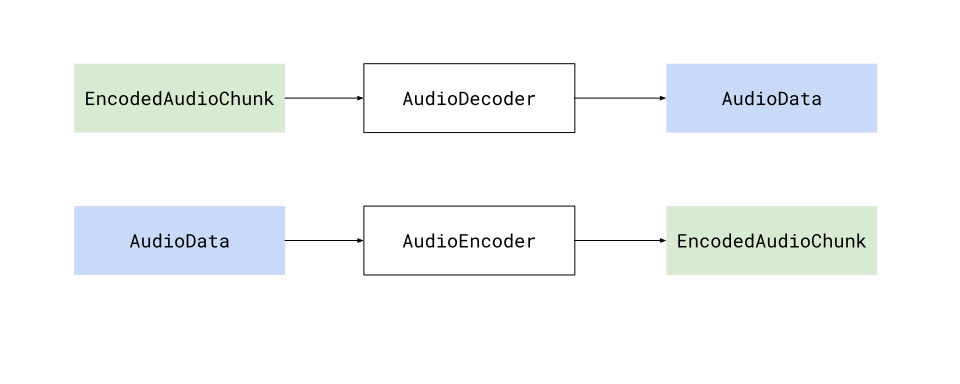
Specifically, the AudioDecoder transforms EncodedAudioChunk objects into AudioData, and the AudioEncoder transforms AudioData into EncodedAudioChunk objects, and when decoding and encoding, there will be a 1:1 correspondence between EncodedAudioChunk objects andAudioData objects.
Audio is easier
Section titled “Audio is easier”Encoding and Decoding is significantly easier for audio than it is for video for a few reasons:
- It is significantly less computationally intense
- It runs on the CPU, and does not require hardware acceleration
- It does not require inter-chunk dependencies
This all makes is so that encoding and decoding can be done as simple async process that you can await.
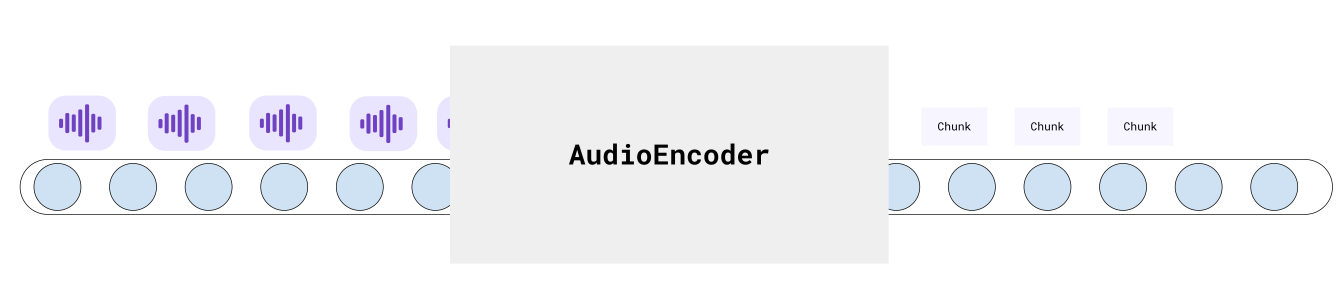
This makes pipelines more predictable and easy to work with.
Decode
Section titled “Decode”Audio decoding is simple enough that my actual production code (below) is simple enough to also be a hello world example
function decodeAudio(chunks: EncodedAudioChunk[], config: AudioDecoderConfig): Promise<AudioData[]>{
    const decodedData: AudioData[] = [];    const total_chunks = audio.chunks.length;
    return new Promise((resolve, reject) => {        if(total_chunks === 0) return resolve(decodedData);
        const decoder = new AudioDecoder({            output: (chunk: AudioData) => {                decodedData.push(chunk);                if(decodedData.length === total_chunks) return resolve(decodedData);            },            error: (e) => {reject(e)}        });
        decoder.configure({            codec: config.codec,            sampleRate: config.sampleRate,            numberOfChannels: config.numberOfChannels        });
        for(const chunk of chunks){            decoder.decode(chunk);        }        decoder.flush();
    });}
The only extra step would be getting the AudioDecoderConfig, which you can get via a demuxing library
Mediabunny
Section titled “Mediabunny”import {Input, MP4, BlobSource} from 'mediabunny'
const input = new Input({ formats: [MP4], source: new BlobSource(file),});
const audioTrack = await input.getPrimaryAudioTrack();const decoderConfig = <AudioDecoderConfig> await audioTrack.getDecoderConfig();// This is what you'd supply to the `AudioDecoder` to start decodingweb-demuxer
Section titled “web-demuxer”import {WebDemuxer} from 'web-demuxer'
const demuxer = new WebDemuxer({ wasmFilePath: "https://cdn.jsdelivr.net/npm/web-demuxer@latest/dist/wasm-files/web-demuxer.wasm",});
await demuxer.load(<File> file);const mediaInfo = await demuxer.getMediaInfo();const audioTrack = mediaInfo.streams.filter((s)=>s.codec_type_string === 'audio')[0];
const decoderConfig: AudioDecoderConfig = { codec: audioTrack.codec_string, sampleRate: audioTrack.sample_rate, numberOfChannels: audioTrack.channels}MP4Demuxer
Section titled “MP4Demuxer”import { MP4Demuxer } from 'webcodecs-utils'
const demuxer = new MP4Demuxer(file);await demuxer.load();
const decoderConfig = <AudioDecoderConfig> demuxer.getAudioDecoderConfig();Encoder
Section titled “Encoder”Likewise, encoding is very simple
function encodeAudio(audio: AudioData[]): Promise<EncodedAudioChunk[]>{
    const encoded_chunks: EncodedAudioChunk[] = [];
    return new Promise(async (resolve, reject) => {        if(audio.length ===0) return resolve(encoded_chunks);
        const encoder = new AudioEncoder({            output: (chunk) => {                encoded_chunks.push(chunk);                if(encoded_chunks.length === audio.length){                    resolve(encoded_chunks);                }            },            error: (e) => { reject(e)},        });
        encoder.configure({            codec: 'mp4a.40.2', //'mp4a.40.2' for MP4, 'opus' for WebM            numberOfChannels: audio[0].numberOfChannels,            sampleRate: audio[0].sampleRate        });
        for(const chunk of audio){            encoder.encode(chunk);        }        encoder.flush();    });
Memory
Section titled “Memory”The main ‘production’ step you’d need to take into account is memory management. Raw audio is not nearly as big as raw video, but it’s still too big to hold several hours of raw audio in memory.
The key would be to limit the amount of AudioData in memory at any given time, ideally by processing it in chunks. Here is a very simple example to transcode an audio file in chunks of ~20 seconds.
Let’s assume we have the decodeAudio and encodeAudio functions mentioned above. You can then just process audio in batches like so:
async function transcodeAudio(sourceChunks: EncodedAudioChunk[], config: AudioDecoderConfig): Promise<EncodedAudioChunk[]> {    const BATCH_LENGTH = 1000;    const transcoded_chunks: EncodedAudioChunk[] = []; // Initialize here
    for (let i = 0; i < Math.ceil(sourceChunks.length / BATCH_LENGTH); i++) {        const batchSourceChunks = sourceChunks.slice(i * BATCH_LENGTH, Math.min((i + 1) * BATCH_LENGTH, sourceChunks.length));        const batchAudio = await decodeAudio(batchSourceChunks, config);        const batchTranscoded = await encodeAudio(batchAudio);        transcoded_chunks.push(...batchTranscoded);    }    return transcoded_chunks;}
This minimizes the total memory used at any given time, and lets you work through transcoding hours of audio without crashing the program.