
EncodedAudioChunk
The EncodedAudioChunk, as you might guess, is the encoded / compressed form of an AudioData object.
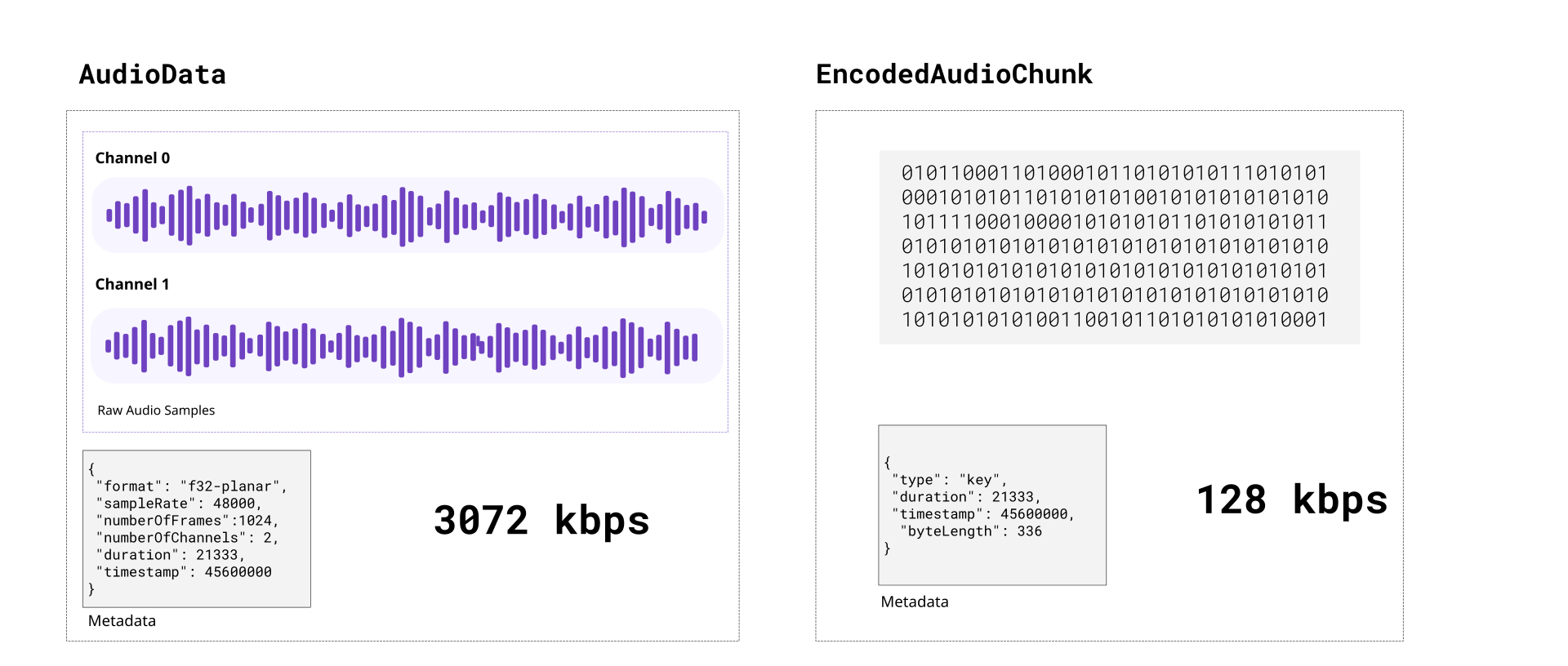
Encoded audio is typically 15 to 20 times more compact than raw audio. Compared to video, raw audio is more compact, encoded audio is much more compact and encoding/decoding is both computationally much easier and much faster.
Unlike with video, each EncodedAudioChunk is essentially a key frame, sequence doesn’t matter, and each EncodedAudioChunk can be decoded independently.
Codecs
Section titled “Codecs”Just like with video, there are a number of audio codecs. Here are some of the main ones you’d encounter in video processing:
AAC: Short for “Advanced Audio Coding”, this is typically the audio codec used in MP4 files.
Opus: An open source codec used typically in WebM files.
MP3: The codec used in MP3 files, the format most people associate with audio.
PCM: Short for Pulse-Code-Modulation, it’s a lossless audio codec which is what is used in .wav files
Only AAC and Opus are actually supported by WebCodecs. You’d need separate libraries to handle MP3 and WAV (PCM) files.
Codec Strings:
Section titled “Codec Strings:”Like with VideoEncoder, for AudioEncoder you don’t just specify ‘aac’ as a codec, you need to specify a full codec string.
For the most compatability use opus with a vp9 codec like vp09.00.50.08.00 in a WebM container, but if you want to output an MP4, just use mp4a.40.2, it is supported in all Safari and Chromium browsers on Windows, macOS, Android, iOS and Chrome OS but not on desktop Linux. AAC audio is not supported on Firefox at all.
Opus Codec Strings
Section titled “Opus Codec Strings”opus- WebCodecs gives you a break here, you can just use ‘opus’ (94.4% support)
AAC Codec Strings
Section titled “AAC Codec Strings”mp4a.40.2- Most common / basic / well supported codec string (87.8% support)mp4a.40.02- basically the same as above (87.8% support)mp4a.40.5- Uses a technique called SBR [2] (87.8% support)mp4a.40.05- basically the same as above (87.8% support)mp4a.40.29- Uses SBR and Parametric stereo [3] (87.8% support)
When decoding audio, you get what the source gives you. If the codec string is ‘mp4a.40.5’, ‘mp4a.40.05’ or ‘mp4a.40.29’, the actual sample rate is double what is specified. For example, if you decode and manually resample audio generated from those codecs, you need to do the following:
function resampleAudio(audio: AudioData[], source_config: AudioDecoderConfig, target_sample_rate: number): AudioData[]{
    let source_sample_rate = source_config.sampleRate;
    if (source_config.codec === "mp4a.40.5" ||        source_config.codec === "mp4a.40.05" ||        source_config.codec === "mp4a.40.29") {        source_sample_rate *= 2;    }
    //Resampling logic}
Demuxing
Section titled “Demuxing”To read EncodedAudioChunk objects from video file, the API is very similar to that for video chunks. Here it is for the same demuxing options as video:
Mediabunny
Section titled “Mediabunny”Here is the code for Mediabunny
import { EncodedPacketSink, Input, ALL_FORMATS, BlobSource } from 'mediabunny';
const input = new Input({  formats: ALL_FORMATS,  source: new BlobSource(<File> file),});
const audioTrack = await input.getPrimaryAudioTrack();const sink = new EncodedPacketSink(audioTrack);
for await (const packet of sink.packets()) {  const chunk = <EncodedVideoChunk> packet.toEncodedAudioChunk();}
web-demuxer
Section titled “web-demuxer”Here is the code for web-demuxer
import { WebDemuxer } from "web-demuxer";
const demuxer = new WebDemuxer();await demuxer.load(<File> file);
const mediaInfo = await demuxer.getMediaInfo();const audioTrack = mediaInfo.streams.filter((s)=>s.codec_type_string === 'audio')[0];

const chunks: EncodedAudioChunk[] = [];
const reader = demuxer.read('audio', start, end).getReader();reader.read().then(async function processPacket({ done:boolean, value: EncodedAudioChunk }) {    if(value) chunks.push(value);    if(done) return resolve(chunks);    return reader.read().then(processPacket)});
MP4Demuxer
Section titled “MP4Demuxer”You can also use the MP4Demuxer utility from webcodecs-utils
import { MP4Demuxer } from 'webcodecs-utils'
const demuxer = new MP4Demuxer(file);await demuxer.load();
const decoderConfig = demuxer.getAudioDecoderConfig();const chunks = await demuxer.extractSegment('video', 0, 30); //First 30 seconds
Muxing
Section titled “Muxing”Muxing EncodedAudioChunks to a file is also fairly similar to muxing EncodedVideoChunks
Mediabunny
Section titled “Mediabunny”import { EncodedPacket, EncodedAudioPacketSource, BufferTarget, Mp4OutputFormat, Output} from 'mediabunny';
async function muxChunks(function(chunks: EncodedAudioChunk[]): Promise <Blob>{
const output = new Output({ format: new Mp4OutputFormat(), target: new BufferTarget(), });
const source = new EncodedAudioPacketSource('aac'); output.addAudioTrack(source);
await output.start();
for (const chunk of chunks){ source.add(EncodedPacket.fromEncodedChunk(chunk)) }
await output.finalize(); const buffer = <ArrayBuffer> output.target.buffer; return new Blob([buffer], { type: 'video/mp4' });
});WebMMuxer/MP4Muxer
Section titled “WebMMuxer/MP4Muxer”While not recommended, you can also use WebMMuxer and MP4Muxer which are deprecated in favor of Mediabunny, but which more directly work with EncodedAudioChunkobjects.
import {ArrayBufferTarget,  Muxer} from "mp4-muxer";async function muxChunks(function(chunks: EncodedAudioChunk[]): Promise <Blob>{
    const muxer = new Muxer({        target: new ArrayBufferTarget(),        audio: {            codec: 'aac',            numberOfChannels: 2, // or whatever the actual values are            sampleRate: 44100 // should come from Audio Encoder        }    });
    for (const chunk of chunks){        muxer.addAudioChunk(chunk);    }
    await muxer.finalize();    const buffer = <ArrayBuffer> output.target.buffer;    return new Blob([buffer], { type: 'video/mp4' });
});
Practical guidance
Section titled “Practical guidance”Because EncodedAudioChunk objects can be decoded independently there aren’t cross-chunk dependencies when decoding, it’s a lot easier just avoid decoding and re-encoding audio.
Avoiding re-encoding
Section titled “Avoiding re-encoding”Often times, if you’re just transcoding, or extracting a clip of a single video source, you don’t need to decode and re-encode audio. You can demux EncodedAudioChunk data from the source file and mux those same chunks directly into your destination file without ever touching an AudioEncoder, AudioDecoder or AudioData.
The fact that EncodedAudioChunk objects correspond to ~0.02 seconds of audio means you can splice the audio and manage the timeline by just filtering out audio chunks.
Let’s say I had a 20 minute source video, you could just extract the a clip from t=600s to t=630s.
For audio you could just do this:
import {getAudioChunks} from 'webcodecs-utils' // About 20 minutes of chunksconst source_chunks = <EncodedAudioChunk[]> = await getAudioChunks(file);//No re-encoding neededconst dest_chunks = source_chunks.filter((chunk)=> chunk.timestamp > 600*1e6 && chunk.timestamp < 630*1e6 );Adjusting timestamps
Section titled “Adjusting timestamps”The above example isn’t quite true, you’d still need to adjust the timestamps, but that’s also still quite easy.
import {getAudioChunks} from 'webcodecs-utils' // About 20 minutes of chunksconst source_chunks = <EncodedAudioChunk[]> = await getAudioChunks(file);
//Extract the clipsconst clip_chunks = source_chunks.filter((chunk)=> chunk.timestamp > 600*1e6 && chunk.timestamp < 630*1e6 );
const final_chunks = clip_chunks.map(function(chunk: EncodedAudioChunk){
    const audio_data = new ArrayBuffer(chunk.byteLength);    chunk.copyTo(audio_data);    //For this example, clip starts at t=600s, so shift everything by 600s    const adjusted_time = chunk.timestamp - 600*1e6;
    return new EncodedAudioChunk({        type: "key",        data: audio_data,        timestamp: adjusted_time,        duration: chunk.duration,    })});
That way you can avoid the decode and encode process, and it will just work.