
WebAudio Playback
WebAudio is a browser API for playing audio in the browser. Just like WebCodecs enables low-level control of video playback compared to the <video> element, WebAudio enables low level control of audio playback compared to the <audio> element.
WebAudio contains all the components to create a custom audio rendering pipeline, including the audio equivalent of <VideoFrame> (source), <canvas> (destination) and WebGPU/ (processing).
| Stage | Video Rendering | Audio Rendering |
|---|---|---|
| Raw Data | VideoFrame | AudioBuffer |
| Processing Pipeline | WebGL / WebGPU | Web Audio API nodes |
| Output Destination | <canvas> | AudioContext.destination (speakers) |
Unlike for video, audio processing is done one API (WebAudio). And while in video, you’d normally think of doing per-frame operations in a loop, as in
for (const frame of frames){ render(frame)}In WebAudio, you need to think of audio processing as a pipeline, with sources, destinations and nodes (intermediate effects / filters).
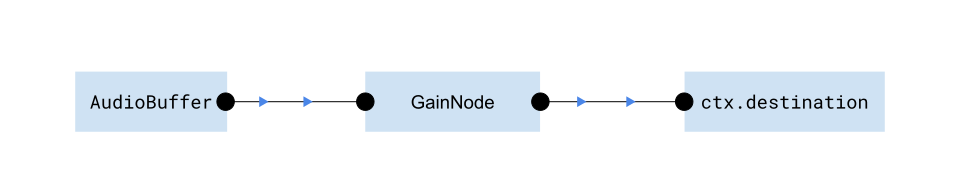
Where GainNode just multiplies the audio signal by a constant (volume control), which is the simplest filter you can add. Here is what this pipeline actually looks like in code:
const ctx = new AudioContext(); //Kind of like audio version of 'canvas context'
const rawFileBinary = <ArrayBuffer> await file.arrayBuffer();const audioBuffer = <AudioBuffer> await ctx.decodeAudioData(rawFileBinary);
const sourceNode = <AudioNode> ctx.createBufferSource();const gainNode  = <AudioNode> ctx.createGain();
sourceNode.connect(gainNode);gainNode.connect(ctx.destination);
sourceNode.start(); //Starts playing audio in your speakers!
Because WebAudio provides the only interface to output custom audio to the user’s speakers, you’ll need to use WebAudio for audio/video playback.
In this article we’ll explain the main components of WebAudio, and then provide some working code examples to play audio in the browser and add basic controls like volume, playback speed and start/stop/seek.
That should provide enough background to then build a full video player with webcodecs and webaudio, which we’ll cover here.
Note: A major limitation of WebAudio is that it only works on the main thread which we’ll need to incorporate into our architecture when we build a full video player.
Concepts
Section titled “Concepts”AudioContext
Section titled “AudioContext”The work with WebAudio, you need to create an AudioContext object, which is like a master interface for WebAudio, and everything you do in WebAudio will require or interact with the AudioContext.
const ctx = new AudioContext();WebAudio works as a ‘graph’, where you have a destination, one or more sources, and intermediate processing items called nodes that you connect together.
The AudioContext is actually an instance of an individual graph, but is also the interface for a bunch of other things like creating nodes and decoding audio.
Buffers
Section titled “Buffers”An AudioBuffer is WebAudio’s representation of raw audio data. You can create an AudioBuffer by using ctx.decodeAudioData(<ArrayBuffer>) like so:
const rawFileBinary = <ArrayBuffer> await file.arrayBuffer();const audioBuffer = <AudioBuffer> await ctx.decodeAudioData(rawFileBinary);If that sounds similar to AudioData and AudioDecoder, it is. Both WebAudio and WebCodecs have a way to decode audio files into raw audio data. But you need AudioBuffer to work with WebAudio, and you need WebAudio to play audio back in browser.
WebAudio also has a much simpler API. You can get raw audio samples from an AudioBuffer as so:
const leftChannel = <Float32Array> audioBuffer.getChannelData(0);const rightChannel = <Float32Array> audioBuffer.getChannelData(1);You can also create an AudioBuffer from raw audio samples as so:
const audioBuffer = <AudioBuffer> await ctx.createAudioBuffer(2, 1000, 44100);audioBuffer.copyToChannel(leftChannel, 0);audioBuffer.copyToChannel(rightChannel, 0);Where you’d first create a new blank AudioBuffer from ctx.createAudioBuffer(numChannels, numSamples, sampleRatate) and then copy float32 data to it.
WebAudio represents the audio processing pipeline as a graph, where you connect nodes together, and there is specifically an AudioNode type, as well as many types of nodes.
Source Node
Section titled “Source Node”To actually play audio, you’ll need a source node, specifically an AudioBufferSourceNode
const sourceNode = <AudioBufferSourceNode> ctx.createBufferSource();sourceNode.buffer = audioBuffer;Destination Node
Section titled “Destination Node”You play the source node, you need to connect it to an AudioDestinationNode, which is just ctx.destination.
const destination = <AudioDestinationNode> ctx.destination;You’d connect it as below:
sourceNode.connect(ctx.destination);Gain Node
Section titled “Gain Node”I don’t want to overcomplicate things, but if you want to build a real audio player, you’ll likely need some intermediate effects, like volume control or playback speed. Probably the simplest is a GainNode which scales the audio by a constant factor (the gain).
You’d create a gain node by doing the following:
const gainNode  = <AudioNode> ctx.createGain();gainNode.gain = 2; // Double the volume
sourceNode.connect(gainNode);gainNode.connect(ctx.destination);
That creates the following pipeline we started with:
Play/pause
Section titled “Play/pause”To actually play audio, you’d use
sourceNode.start(); //Starts playing audio in your speakers!This source will pass audio through all the effects/nodes you connected in the graph. It will keep playing the source audio until it goes through the entire audio.
You can detect when the audio finishes with the onendedcallback:
sourceNode.onended = () => {//finish handler};And you can stop the audio at any time:
sourceNode.stop();You can also “seek” by starting the audio at a specific point in the audio (in seconds)
sourceNode.start(0, 10); //starts playing immediately, from t=10 in sourceSo if you had a 20 second audio clip, the above would start playing from halfway through the clip.
Timeline
Section titled “Timeline”While WebAudio has an otherwise simple API, managing the playback timeline is where it gets annoyingly difficult.
Problem:
Web Audio lets you connect multiple audio sources.
sourceNode1.connect(ctx.destination);sourceNode2.connect(ctx.destination);sourceNode1.start();sourceNode2.start();This will play both audio sources back at the same time. But each source might have a different duration. You can also stop one source arbitrarily:
sourceNode1.stop();And don’t forget that we can seek within sources.
sourceNode2.start(0, 10);So then, how do measure playback progress? How do you construct a universal timeline when you can arbitrarily add and remove sources mid playback?
Solution:
WebAudio’s solution is to measure time from when you create the AudioContext using ctx.currentTime.
const ctx = new AudioContext();console.log(ctx.currentTime); //0This ‘internal clock’ will keep ticking even if you don’t play anything. It literally just measures how much time (in seconds) has passed since you created it.
setTimeout(()=>console.log(ctx.currentTime), 1000); //~1 secondsetTimeout(()=>console.log(ctx.currentTime), 5000); //~5 secondssetTimeout(()=>console.log(ctx.currentTime), 7000); //~7 secondsThis creates a consistent, reliable reference point to do timeline calculations.
Management
But then it’s up to you to do those calculations. Presumably as the application developer, you know and have control over what audio sources you are going to play and when, and how long each audio source is.
So let’s say you create an AudioBuffer 10 seconds after the AudioContext is created. The AudioBuffer corresponds to a 15 second clip, and you plan to play just 3 seconds of audio, corresponding to t=5 to t=8 in the source audio file.
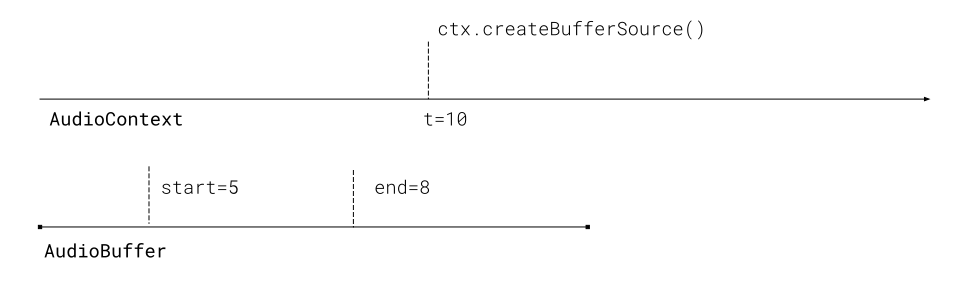
You’re now working with multiple timelines, including (a) the AudioContext timeline, (b) the source audio file timeline, and (c) the timeline you want to display to users. It’s up to you to keep track of the different timelines, and calculate offsets as necessary.
To illustrate the fictitious scenario, to play the audio properly, you would do
sourceNode2.start(10, 5, 3);Where you start playing the source when ctx.currentTime==10, start playing from 5 seconds into the file, and you play for 3 seconds.
Playback progress would be
const playBackProgress = (ctx.currentTime - 10)/3;Practically speaking, for playing back a single audio file, you’d keep track of the value of ctx.currentTime every time you stop and start the audio, and you’d need to calculate offsets properly, coordinating between the different timelines.
Clean up
Section titled “Clean up”When everything is done, you can clean up by disconnecting all the nodes
sourceNode.disconnect();And you can close the AudioContext when you’re done to free up resources.
ctx.close();Memory
Section titled “Memory”Just keep in mind that raw audio is still quite big with 1 hour of audio taking up more than 1GB of RAM. We don’t specifically worry about memory in the examples in this section, but we’ll handle memory management when we get to designing a full video player.
WebAudio audio player
Section titled “WebAudio audio player”Now let’s build a working audio player step by step. We’ll use a 14 second audio clip from Big Buck Bunny as a demo.
Basic Playback with Start/Stop
Section titled “Basic Playback with Start/Stop”Let’s implement basic audio playback with play and stop controls.
Setup: First we need our variables and load the audio
let audioContext = null;let audioBuffer = null;let sourceNode = null;let startTime = 0;
async function loadAudio() {    // Create AudioContext    audioContext = new AudioContext();
    // Fetch audio file    const response = await fetch('bbb-excerpt.mp3');    const arrayBuffer = await response.arrayBuffer();
// Decode audio data audioBuffer = await audioContext.decodeAudioData(arrayBuffer);}play(): Create a source node, connect it, and start playback
function play() {    if (!audioBuffer || sourceNode) return;
    // Create source node    sourceNode = audioContext.createBufferSource();    sourceNode.buffer = audioBuffer;    sourceNode.connect(audioContext.destination);
    // Handle when audio finishes    sourceNode.onended = () => {        sourceNode = null;    };
    // Start playing    startTime = audioContext.currentTime;    sourceNode.start();
updateTime();}stop(): Stop playback and reset
function stop() { if (sourceNode) { sourceNode.onended = () => {}; // Clear handler to prevent it firing sourceNode.stop(); sourceNode = null; }}updateTime(): Track and display current playback time
function updateTime() {    if (!sourceNode) return;
    const elapsed = audioContext.currentTime - startTime;    currentTimeEl.textContent = elapsed.toFixed(2);
    requestAnimationFrame(updateTime);}
Here’s the complete working example:
Full Source Code
<!DOCTYPE html><html lang="en"><head>  <meta charset="UTF-8">  <meta name="viewport" content="width=device-width, initial-scale=1.0">  <title>WebAudio Basic Playback</title>  <style>    body {      font-family: system-ui, -apple-system, sans-serif;      max-width: 800px;      margin: 40px auto;      padding: 0 20px;    }    h3 {      margin-top: 0;    }    .demo-section {      margin: 30px 0;      padding: 20px;      background: #f5f5f5;      border-radius: 8px;    }    .demo-section h4 {      margin-top: 0;    }    .controls {      margin: 20px 0;    }    button {      padding: 10px 20px;      font-size: 16px;      cursor: pointer;      margin: 5px;      border: none;      border-radius: 4px;      background: #2196f3;      color: white;    }    button:hover {      background: #1976d2;    }    button:disabled {      background: #ccc;      cursor: not-allowed;    }    .stats {      font-family: monospace;      background: white;      padding: 15px;      margin: 15px 0;      border-radius: 4px;      border: 1px solid #ddd;    }    audio {      width: 100%;      margin: 10px 0;    }  </style></head><body>
  <h4>Web Audio Playback</h4>  <div class="controls">    <button id="playBtn">Play</button>    <button id="stopBtn" disabled>Stop</button>  </div>
  <div class="stats">    <div>Status: <span id="status">Ready</span></div>    <div>Current Time: <span id="currentTime">0.00</span>s</div>    <div>Duration: <span id="duration">0.00</span>s</div>  </div>  <h4>Native Audio Element (for comparison)</h4>    <audio controls src="bbb-excerpt.mp3"></audio>
  <script>    const playBtn = document.getElementById('playBtn');    const stopBtn = document.getElementById('stopBtn');    const statusEl = document.getElementById('status');    const currentTimeEl = document.getElementById('currentTime');    const durationEl = document.getElementById('duration');
    let audioContext = null;    let audioBuffer = null;    let sourceNode = null;    let startTime = 0;
    // Load and decode audio file    async function loadAudio() {      statusEl.textContent = 'Loading...';
      // Create AudioContext      audioContext = new AudioContext();
      // Fetch audio file      const response = await fetch('bbb-excerpt.mp3');      const arrayBuffer = await response.arrayBuffer();
      // Decode audio data      audioBuffer = await audioContext.decodeAudioData(arrayBuffer);
      durationEl.textContent = audioBuffer.duration.toFixed(2);      statusEl.textContent = 'Ready';    }
    // Play audio    function play() {      if (!audioBuffer || sourceNode) return;
      // Create source node      sourceNode = audioContext.createBufferSource();      sourceNode.buffer = audioBuffer;
      // Connect to destination (speakers)      sourceNode.connect(audioContext.destination);
      // Handle when audio finishes      sourceNode.onended = () => {        statusEl.textContent = 'Finished';        playBtn.disabled = false;        stopBtn.disabled = true;        sourceNode = null;      };
      // Start playing      startTime = audioContext.currentTime;      sourceNode.start();
      statusEl.textContent = 'Playing';      playBtn.disabled = true;      stopBtn.disabled = false;
      updateTime();    }
    // Stop audio    function stop() {      if (sourceNode) {        sourceNode.onended = () => {};        sourceNode.stop();        sourceNode = null;      }
      statusEl.textContent = 'Stopped';      playBtn.disabled = false;      stopBtn.disabled = true;      currentTimeEl.textContent = '0.00';    }
    // Update time display    function updateTime() {      if (!sourceNode) return;
      const elapsed = audioContext.currentTime - startTime;      currentTimeEl.textContent = elapsed.toFixed(2);
      requestAnimationFrame(updateTime);    }
    // Event listeners    playBtn.addEventListener('click', play);    stopBtn.addEventListener('click', stop);
    // Load audio on page load    loadAudio().catch(err => {      console.error('Error loading audio:', err);      statusEl.textContent = 'Error: ' + err.message;    });  </script></body></html>
Seek and Timeline Management
Section titled “Seek and Timeline Management”The tricky part of Web Audio is managing pause, resume, and seeking. Since AudioBufferSourceNode can’t be paused (only started and stopped), we need to track the timeline ourselves.
Timeline variables: We’ll track where we are in the audio and when we started playing
let startTime = 0; // When playback started (in AudioContext time)let pausedAt = 0; // Where we paused (in audio file time)let isPlaying = false;getCurrentTime(): Calculate the current playback position
function getCurrentTime() { if (!isPlaying) return pausedAt; return pausedAt + (audioContext.currentTime - startTime);}play(): Start or resume playback from the current position
function play() {    if (!audioBuffer || isPlaying) return;
    // Create new source node    sourceNode = audioContext.createBufferSource();    sourceNode.buffer = audioBuffer;    sourceNode.connect(audioContext.destination);
    // Handle end of playback    sourceNode.onended = () => {        if (isPlaying) {            isPlaying = false;            pausedAt = 0;        }    };
    // Start playing from pausedAt position    startTime = audioContext.currentTime;    sourceNode.start(0, pausedAt);  // Second parameter is offset in the audio
isPlaying = true;}pause(): Pause playback and remember where we stopped
function pause() {    if (!isPlaying || !sourceNode) return;
    // Calculate where we are in the audio    pausedAt = getCurrentTime();
    // IMPORTANT: Clear onended handler to prevent it from firing    sourceNode.onended = () => {};    sourceNode.stop();    sourceNode = null;
    isPlaying = false;
}seekTo(): Jump to a specific time in the audio
function seekTo(time) {    const wasPlaying = isPlaying;
    // Stop current playback    if (isPlaying) {        // IMPORTANT: Clear onended handler before stopping        sourceNode.onended = () => {};        sourceNode.stop();        sourceNode = null;        isPlaying = false;
    }
    // Update position    pausedAt = Math.max(0, Math.min(time, audioBuffer.duration));
    // Resume if we were playing    if (wasPlaying) {        play();    }}
Important note: When stopping a source node that will be replaced (like during pause or seek), you must clear the onended handler first. Otherwise, the old source’s onended callback can fire after the new source starts, resetting your playback state unexpectedly.
Here’s the complete working example with pause/resume and seek controls:
Full Source Code
<!DOCTYPE html><html lang="en"><head>  <meta charset="UTF-8">  <meta name="viewport" content="width=device-width, initial-scale=1.0">  <title>WebAudio Seek and Timeline</title>  <style>    body {      font-family: system-ui, -apple-system, sans-serif;      max-width: 800px;      margin: 40px auto;      padding: 0 20px;    }    h3 {      margin-top: 0;    }    .demo-section {      margin: 30px 0;      padding: 20px;      background: #f5f5f5;      border-radius: 8px;    }    .demo-section h4 {      margin-top: 0;    }    .controls {      margin: 20px 0;    }    button {      padding: 10px 20px;      font-size: 16px;      cursor: pointer;      margin: 5px;      border: none;      border-radius: 4px;      background: #2196f3;      color: white;    }    button:hover {      background: #1976d2;    }    button:disabled {      background: #ccc;      cursor: not-allowed;    }    button.seek-btn {      background: #ff9800;      padding: 8px 16px;      font-size: 14px;    }    button.seek-btn:hover {      background: #f57c00;    }    .stats {      font-family: monospace;      background: white;      padding: 15px;      margin: 15px 0;      border-radius: 4px;      border: 1px solid #ddd;    }    .seek-controls {      display: flex;      gap: 10px;      align-items: center;      margin: 15px 0;      flex-wrap: wrap;    }    input[type="range"] {      flex: 1;      min-width: 200px;    }    .time-display {      font-family: monospace;      font-size: 18px;      font-weight: bold;    }  </style></head><body>  <h3>WebAudio Seek and Timeline Management</h3>  <p>Implementing pause, resume, and seeking functionality.</p>
  <div class="demo-section">    <h4>Playback with Seek Controls</h4>    <div class="controls">      <button id="playBtn">Play</button>      <button id="pauseBtn" disabled>Pause</button>      <button id="stopBtn" disabled>Stop</button>    </div>
    <div class="seek-controls">      <input type="range" id="seekBar" min="0" max="100" value="0" step="0.1">      <span class="time-display">        <span id="currentTime">0.0</span> / <span id="duration">0.0</span>s      </span>    </div>
    <div class="seek-controls">      <span>Jump to:</span>      <button class="seek-btn" id="seek0">0s</button>      <button class="seek-btn" id="seek5">5s</button>      <button class="seek-btn" id="seek10">10s</button>    </div>
    <div class="stats">      <div>Status: <span id="status">Ready</span></div>      <div>AudioContext Time: <span id="ctxTime">0.00</span>s</div>      <div>Start Offset: <span id="startOffset">0.00</span>s</div>      <div>Pause Time: <span id="pauseTime">0.00</span>s</div>    </div>  </div>
  <script>    const playBtn = document.getElementById('playBtn');    const pauseBtn = document.getElementById('pauseBtn');    const stopBtn = document.getElementById('stopBtn');    const seekBar = document.getElementById('seekBar');    const seek0Btn = document.getElementById('seek0');    const seek5Btn = document.getElementById('seek5');    const seek10Btn = document.getElementById('seek10');
    const statusEl = document.getElementById('status');    const currentTimeEl = document.getElementById('currentTime');    const durationEl = document.getElementById('duration');    const ctxTimeEl = document.getElementById('ctxTime');    const startOffsetEl = document.getElementById('startOffset');    const pauseTimeEl = document.getElementById('pauseTime');
    let audioContext = null;    let audioBuffer = null;    let sourceNode = null;
    // Timeline tracking variables    let startTime = 0;           // When playback started (in AudioContext time)    let pausedAt = 0;            // Where we paused (in audio file time)    let isPlaying = false;    let animationFrameId = null;
    // Load and decode audio file    async function loadAudio() {      statusEl.textContent = 'Loading...';
      audioContext = new AudioContext();
      const response = await fetch('bbb-excerpt.mp3');      const arrayBuffer = await response.arrayBuffer();
      audioBuffer = await audioContext.decodeAudioData(arrayBuffer);
      const duration = audioBuffer.duration;      durationEl.textContent = duration.toFixed(1);      seekBar.max = duration;
      statusEl.textContent = 'Ready';    }
    // Calculate current playback position    function getCurrentTime() {      if (!isPlaying) return pausedAt;      return pausedAt + (audioContext.currentTime - startTime);    }
    // Play from current position    function play() {      if (!audioBuffer || isPlaying) return;
      // Create new source node      sourceNode = audioContext.createBufferSource();      sourceNode.buffer = audioBuffer;      sourceNode.connect(audioContext.destination);
      // Handle end of playback      sourceNode.onended = () => {        if (isPlaying) {          isPlaying = false;          pausedAt = 0;          updateUI();        }      };
      // Start playing from pausedAt position      startTime = audioContext.currentTime;      sourceNode.start(0, pausedAt);
      isPlaying = true;      updateUI();      updateTime();    }
    // Pause playback    function pause() {      if (!isPlaying || !sourceNode) return;
      // Calculate where we are in the audio      pausedAt = getCurrentTime();
      // Clear onended handler to prevent it from firing      sourceNode.onended = () => {};      sourceNode.stop();      sourceNode = null;
      isPlaying = false;
      if (animationFrameId) {        cancelAnimationFrame(animationFrameId);        animationFrameId = null;      }
      updateUI();    }
    // Stop and reset    function stop() {      if (sourceNode) {        sourceNode.onended = () => {};        sourceNode.stop();        sourceNode = null;      }
      isPlaying = false;      pausedAt = 0;
      if (animationFrameId) {        cancelAnimationFrame(animationFrameId);        animationFrameId = null;      }
      updateUI();    }
    // Seek to specific time    function seekTo(time) {      const wasPlaying = isPlaying;
      // Stop current playback      if (isPlaying) {        sourceNode.onended = () => {};        sourceNode.stop();        sourceNode = null;        isPlaying = false;        if (animationFrameId) {          cancelAnimationFrame(animationFrameId);          animationFrameId = null;        }      }
      // Update position      pausedAt = Math.max(0, Math.min(time, audioBuffer.duration));
      // Resume if we were playing      if (wasPlaying) {        play();      } else {        updateUI();      }    }
    // Update time display    function updateTime() {      if (!isPlaying) return;
      const current = getCurrentTime();      currentTimeEl.textContent = current.toFixed(1);      seekBar.value = current;      ctxTimeEl.textContent = audioContext.currentTime.toFixed(2);      startOffsetEl.textContent = pausedAt.toFixed(2);      pauseTimeEl.textContent = pausedAt.toFixed(2);
      animationFrameId = requestAnimationFrame(updateTime);    }
    // Update UI state    function updateUI() {      if (isPlaying) {        statusEl.textContent = 'Playing';        playBtn.disabled = true;        pauseBtn.disabled = false;        stopBtn.disabled = false;      } else {        statusEl.textContent = pausedAt > 0 ? 'Paused' : 'Stopped';        playBtn.disabled = false;        pauseBtn.disabled = true;        stopBtn.disabled = pausedAt === 0;      }
      currentTimeEl.textContent = pausedAt.toFixed(1);      seekBar.value = pausedAt;      ctxTimeEl.textContent = audioContext ? audioContext.currentTime.toFixed(2) : '0.00';      startOffsetEl.textContent = pausedAt.toFixed(2);      pauseTimeEl.textContent = pausedAt.toFixed(2);    }
    // Event listeners    playBtn.addEventListener('click', play);    pauseBtn.addEventListener('click', pause);    stopBtn.addEventListener('click', stop);
    seekBar.addEventListener('input', (e) => {      seekTo(parseFloat(e.target.value));    });
    seek0Btn.addEventListener('click', () => seekTo(0));    seek5Btn.addEventListener('click', () => seekTo(5));    seek10Btn.addEventListener('click', () => seekTo(10));
    // Load audio on page load    loadAudio().catch(err => {      console.error('Error loading audio:', err);      statusEl.textContent = 'Error: ' + err.message;    });  </script></body></html>
Extra functionality
Section titled “Extra functionality”Okay, so we’ve gotten through the barebones playback of audio in WebAudio. Now to cover some very basic controls that most people would include in an audio or video player.
Volume Control with GainNode
Section titled “Volume Control with GainNode”To control volume, we use a GainNode which sits between the source and the destination. The gain value ranges from 0 (silent) to 1 (full volume), though you can go higher for amplification.
Setup: Create the gain node once when initializing
let gainNode = null;
async function loadAudio() {    audioContext = new AudioContext();
    // Create gain node and connect to destination    gainNode = audioContext.createGain();    gainNode.connect(audioContext.destination);    gainNode.gain.value = 0.5; // Start at 50% volume
    // ... rest of audio loading code}
Connect source through gain node: When playing, connect the source to the gain node instead of directly to the destination
function play() {    // ... create source node ...
    // Connect source to gain node (not directly to destination)    sourceNode.connect(gainNode);
    // ... start playback ...}
Update volume: Change the gain value in real-time
function updateVolume(value) {    if (!gainNode) return;
    // Convert 0-100 slider to 0-1 gain value    const gain = value / 100;    gainNode.gain.value = gain;}
The gain node persists across source node changes, so you only create it once and all audio flows through it.
Here’s the complete example with volume control:
Full Source Code
<!DOCTYPE html><html lang="en"><head>  <meta charset="UTF-8">  <meta name="viewport" content="width=device-width, initial-scale=1.0">  <title>WebAudio Volume Control</title>  <style>    body {      font-family: system-ui, -apple-system, sans-serif;      max-width: 800px;      margin: 40px auto;      padding: 0 20px;    }    h3 {      margin-top: 0;    }    .demo-section {      margin: 30px 0;      padding: 20px;      background: #f5f5f5;      border-radius: 8px;    }    .demo-section h4 {      margin-top: 0;    }    .controls {      margin: 20px 0;    }    button {      padding: 10px 20px;      font-size: 16px;      cursor: pointer;      margin: 5px;      border: none;      border-radius: 4px;      background: #2196f3;      color: white;    }    button:hover {      background: #1976d2;    }    button:disabled {      background: #ccc;      cursor: not-allowed;    }    .stats {      font-family: monospace;      background: white;      padding: 15px;      margin: 15px 0;      border-radius: 4px;      border: 1px solid #ddd;    }    .seek-controls {      display: flex;      gap: 10px;      align-items: center;      margin: 15px 0;      flex-wrap: wrap;    }    .volume-control {      display: flex;      gap: 15px;      align-items: center;      margin: 15px 0;      padding: 15px;      background: white;      border-radius: 4px;      border: 1px solid #ddd;    }    .volume-control label {      font-weight: bold;      min-width: 60px;    }    input[type="range"] {      flex: 1;      min-width: 200px;    }    .time-display {      font-family: monospace;      font-size: 18px;      font-weight: bold;    }    .volume-display {      font-family: monospace;      font-size: 16px;      font-weight: bold;      min-width: 40px;      text-align: right;    }  </style></head><body>  <h3>WebAudio Volume Control with GainNode</h3>  <p>Using a GainNode to control volume during playback.</p>
  <div class="demo-section">    <h4>Playback with Volume Control</h4>    <div class="controls">      <button id="playBtn">Play</button>      <button id="pauseBtn" disabled>Pause</button>      <button id="stopBtn" disabled>Stop</button>    </div>
    <div class="seek-controls">      <input type="range" id="seekBar" min="0" max="100" value="0" step="0.1">      <span class="time-display">        <span id="currentTime">0.0</span> / <span id="duration">0.0</span>s      </span>    </div>
    <div class="volume-control">      <label for="volumeSlider">Volume:</label>      <input type="range" id="volumeSlider" min="0" max="100" value="50" step="1">      <span class="volume-display"><span id="volumePercent">50</span>%</span>    </div>
    <div class="stats">      <div>Status: <span id="status">Ready</span></div>      <div>Gain Value: <span id="gainValue">0.50</span></div>    </div>  </div>
  <script>    const playBtn = document.getElementById('playBtn');    const pauseBtn = document.getElementById('pauseBtn');    const stopBtn = document.getElementById('stopBtn');    const seekBar = document.getElementById('seekBar');    const volumeSlider = document.getElementById('volumeSlider');
    const statusEl = document.getElementById('status');    const currentTimeEl = document.getElementById('currentTime');    const durationEl = document.getElementById('duration');    const volumePercentEl = document.getElementById('volumePercent');    const gainValueEl = document.getElementById('gainValue');
    let audioContext = null;    let audioBuffer = null;    let sourceNode = null;    let gainNode = null;
    // Timeline tracking variables    let startTime = 0;    let pausedAt = 0;    let isPlaying = false;    let animationFrameId = null;
    // Load and decode audio file    async function loadAudio() {      statusEl.textContent = 'Loading...';
      audioContext = new AudioContext();
      // Create gain node      gainNode = audioContext.createGain();      gainNode.connect(audioContext.destination);      gainNode.gain.value = 0.5; // Start at 50% volume
      const response = await fetch('bbb-excerpt.mp3');      const arrayBuffer = await response.arrayBuffer();
      audioBuffer = await audioContext.decodeAudioData(arrayBuffer);
      const duration = audioBuffer.duration;      durationEl.textContent = duration.toFixed(1);      seekBar.max = duration;
      statusEl.textContent = 'Ready';    }
    // Calculate current playback position    function getCurrentTime() {      if (!isPlaying) return pausedAt;      return pausedAt + (audioContext.currentTime - startTime);    }
    // Play from current position    function play() {      if (!audioBuffer || isPlaying) return;
      // Create new source node      sourceNode = audioContext.createBufferSource();      sourceNode.buffer = audioBuffer;
      // Connect source to gain node (not directly to destination)      sourceNode.connect(gainNode);
      // Handle end of playback      sourceNode.onended = () => {        if (isPlaying) {          isPlaying = false;          pausedAt = 0;          updateUI();        }      };
      // Start playing from pausedAt position      startTime = audioContext.currentTime;      sourceNode.start(0, pausedAt);
      isPlaying = true;      updateUI();      updateTime();    }
    // Pause playback    function pause() {      if (!isPlaying || !sourceNode) return;
      pausedAt = getCurrentTime();
      sourceNode.onended = () => {};      sourceNode.stop();      sourceNode = null;
      isPlaying = false;
      if (animationFrameId) {        cancelAnimationFrame(animationFrameId);        animationFrameId = null;      }
      updateUI();    }
    // Stop and reset    function stop() {      if (sourceNode) {        sourceNode.onended = () => {};        sourceNode.stop();        sourceNode = null;      }
      isPlaying = false;      pausedAt = 0;
      if (animationFrameId) {        cancelAnimationFrame(animationFrameId);        animationFrameId = null;      }
      updateUI();    }
    // Seek to specific time    function seekTo(time) {      const wasPlaying = isPlaying;
      if (isPlaying) {        sourceNode.onended = () => {};        sourceNode.stop();        sourceNode = null;        isPlaying = false;        if (animationFrameId) {          cancelAnimationFrame(animationFrameId);          animationFrameId = null;        }      }
      pausedAt = Math.max(0, Math.min(time, audioBuffer.duration));
      if (wasPlaying) {        play();      } else {        updateUI();      }    }
    // Update volume    function updateVolume(value) {      if (!gainNode) return;
      // Convert 0-100 slider to 0-1 gain value      const gain = value / 100;      gainNode.gain.value = gain;
      volumePercentEl.textContent = value;      gainValueEl.textContent = gain.toFixed(2);    }
    // Update time display    function updateTime() {      if (!isPlaying) return;
      const current = getCurrentTime();      currentTimeEl.textContent = current.toFixed(1);      seekBar.value = current;
      animationFrameId = requestAnimationFrame(updateTime);    }
    // Update UI state    function updateUI() {      if (isPlaying) {        statusEl.textContent = 'Playing';        playBtn.disabled = true;        pauseBtn.disabled = false;        stopBtn.disabled = false;      } else {        statusEl.textContent = pausedAt > 0 ? 'Paused' : 'Stopped';        playBtn.disabled = false;        pauseBtn.disabled = true;        stopBtn.disabled = pausedAt === 0;      }
      currentTimeEl.textContent = pausedAt.toFixed(1);      seekBar.value = pausedAt;    }
    // Event listeners    playBtn.addEventListener('click', play);    pauseBtn.addEventListener('click', pause);    stopBtn.addEventListener('click', stop);
    seekBar.addEventListener('input', (e) => {      seekTo(parseFloat(e.target.value));    });
    volumeSlider.addEventListener('input', (e) => {      updateVolume(parseInt(e.target.value));    });
    // Load audio on page load    loadAudio().catch(err => {      console.error('Error loading audio:', err);      statusEl.textContent = 'Error: ' + err.message;    });  </script></body></html>
Setting Playback Speed
Section titled “Setting Playback Speed”Another common feature of most players is to control playback speed (e.g. play audio back at 2x speed or 0.5x speed).
There is a sourceNode.playbackRate property which you can use to set the playback speed
sourceNode.playbackRate.value = 2.0;But doing this, by itself, will create a “chipmunk effect”, affecting the pitch and tone of the sounds and music being played.
This problem can be solved with “Pitch correction”, which accounts for this and adjusts the audio to preserve pitch and tone while playing back at different speeds. The <audio> element does pitch correction internally in the browser, but unhelpfully, pitch correction is not handled by default in WebAudio.
AudioWorklets and SoundTouch
Section titled “AudioWorklets and SoundTouch”WebAudio does allow you to do custom audio processing by adding custom nodes via something called an AudioWorklet, which enables custom processing of audio in a separate worker thread.
You can read up how to build your own custom AudioWorklet here. Fortunately, we don’t need to make our own custom pitch correction script, you can use a pre-built one from the SoundTouch JS library
You can load the SoundTouch worklet as shown below:
let soundTouchLoaded = false;
async function loadSoundTouchWorklet() {    try {        await audioContext.audioWorklet.addModule(            'https://cdn.jsdelivr.net/npm/@soundtouchjs/audio-worklet@0.2.1/dist/soundtouch-worklet.js'        );        soundTouchLoaded = true;    } catch (error) {        console.error('Failed to load SoundTouch worklet:', error);        soundTouchLoaded = false;    }}
Then you create a SoundTouch processor and set its pitch parameter:
function createSoundTouchNode(playbackSpeed) {    if (!soundTouchLoaded) return null;
    try {        const node = new AudioWorkletNode(audioContext, 'soundtouch-processor');        // Pitch parameter is INVERSE of speed for pitch correction        node.parameters.get('pitch').value = 1 / playbackSpeed;        return node;    } catch (error) {        console.error('Failed to create SoundTouch node:', error);        return null;    }}
Next, you set up the the audio chain: source -> soundtouch -> destination. Keep in mind, you need to set both playbackRate on the source and pitch on SoundTouch:
function play() {    // Create nodes    sourceNode = audioContext.createBufferSource();    sourceNode.buffer = audioBuffer;    soundTouchNode = createSoundTouchNode(playbackSpeed);
    if (soundTouchNode) {        // With pitch correction: source -> soundtouch -> destination        sourceNode.connect(soundTouchNode);        soundTouchNode.connect(audioContext.destination);
        // Set BOTH playbackRate and pitch        sourceNode.playbackRate.value = playbackSpeed;  // Changes actual speed        // pitch parameter already set in createSoundTouchNode    } else {        // Fallback without pitch correction        sourceNode.connect(audioContext.destination);        sourceNode.playbackRate.value = playbackSpeed;    }
    sourceNode.start(0, pausedAt);}
To change speed while playing, you need to stop and restart the audio:
function setSpeed(speed) {    playbackSpeed = speed;
    if (isPlaying) {        const currentTime = getCurrentTime();        pause();        pausedAt = currentTime;        play();  // Creates new nodes with updated speed    }}
Why restart? AudioWorklet parameters can’t be changed on-the-fly reliably, and you need to recreate the audio chain with the new pitch setting.
Here’s a complete example with multiple speed options:
Full Source Code
<!DOCTYPE html><html lang="en"><head>  <meta charset="UTF-8">  <meta name="viewport" content="width=device-width, initial-scale=1.0">  <title>WebAudio Playback Speed with Pitch Correction</title>  <style>    body {      font-family: system-ui, -apple-system, sans-serif;      max-width: 800px;      margin: 40px auto;      padding: 0 20px;    }    h3 {      margin-top: 0;    }    .demo-section {      margin: 30px 0;      padding: 20px;      background: #f5f5f5;      border-radius: 8px;    }    .demo-section h4 {      margin-top: 0;    }    .controls {      margin: 20px 0;    }    button {      padding: 10px 20px;      font-size: 16px;      cursor: pointer;      margin: 5px;      border: none;      border-radius: 4px;      background: #2196f3;      color: white;    }    button:hover {      background: #1976d2;    }    button:disabled {      background: #ccc;      cursor: not-allowed;    }    button.speed-btn {      background: #9c27b0;      padding: 8px 16px;      font-size: 14px;    }    button.speed-btn:hover {      background: #7b1fa2;    }    button.speed-btn.active {      background: #4a148c;      font-weight: bold;    }    .stats {      font-family: monospace;      background: white;      padding: 15px;      margin: 15px 0;      border-radius: 4px;      border: 1px solid #ddd;    }    .seek-controls {      display: flex;      gap: 10px;      align-items: center;      margin: 15px 0;      flex-wrap: wrap;    }    .speed-controls {      display: flex;      gap: 10px;      align-items: center;      margin: 15px 0;      flex-wrap: wrap;    }    input[type="range"] {      flex: 1;      min-width: 200px;    }    .time-display {      font-family: monospace;      font-size: 18px;      font-weight: bold;    }    .warning {      background: #fff3cd;      border: 1px solid #ffc107;      padding: 10px;      border-radius: 4px;      margin: 10px 0;    }  </style></head><body>  <h3>WebAudio Playback Speed with Pitch Correction</h3>  <p>Using SoundTouch AudioWorklet for pitch-preserving playback speed control.</p>
  <div class="demo-section">    <h4>Playback with Speed Control</h4>
    <div class="warning" id="workletWarning" style="display: none;">      ⚠️ SoundTouch worklet failed to load. Falling back to native playbackRate (pitch will shift).    </div>
    <div class="controls">      <button id="playBtn">Play</button>      <button id="pauseBtn" disabled>Pause</button>      <button id="stopBtn" disabled>Stop</button>    </div>
    <div class="seek-controls">      <input type="range" id="seekBar" min="0" max="100" value="0" step="0.1">      <span class="time-display">        <span id="currentTime">0.0</span> / <span id="duration">0.0</span>s      </span>    </div>
    <div class="speed-controls">      <span style="font-weight: bold;">Speed:</span>      <button class="speed-btn" data-speed="0.5">0.5x</button>      <button class="speed-btn active" data-speed="1">1x</button>      <button class="speed-btn" data-speed="2">2x</button>      <button class="speed-btn" data-speed="4">4x</button>    </div>
    <div class="stats">      <div>Status: <span id="status">Loading...</span></div>      <div>Playback Speed: <span id="speedDisplay">1.0</span>x</div>      <div>Using SoundTouch: <span id="soundtouchStatus">Loading...</span></div>    </div>  </div>
  <script type="module">    const playBtn = document.getElementById('playBtn');    const pauseBtn = document.getElementById('pauseBtn');    const stopBtn = document.getElementById('stopBtn');    const seekBar = document.getElementById('seekBar');    const speedButtons = document.querySelectorAll('.speed-btn');
    const statusEl = document.getElementById('status');    const currentTimeEl = document.getElementById('currentTime');    const durationEl = document.getElementById('duration');    const speedDisplayEl = document.getElementById('speedDisplay');    const soundtouchStatusEl = document.getElementById('soundtouchStatus');    const workletWarningEl = document.getElementById('workletWarning');
    let audioContext = null;    let audioBuffer = null;    let sourceNode = null;    let soundTouchNode = null;    let soundTouchLoaded = false;
    // Timeline tracking    let startTime = 0;    let pausedAt = 0;    let isPlaying = false;    let animationFrameId = null;    let playbackSpeed = 1.0;
    // Load SoundTouch worklet    async function loadSoundTouchWorklet() {      try {        soundtouchStatusEl.textContent = 'Loading...';
        // Load from CDN        await audioContext.audioWorklet.addModule(          'https://cdn.jsdelivr.net/npm/@soundtouchjs/audio-worklet@0.2.1/dist/soundtouch-worklet.js'        );
        soundTouchLoaded = true;        soundtouchStatusEl.textContent = 'Yes (pitch correction enabled)';        console.log('✅ SoundTouch worklet loaded successfully');      } catch (error) {        console.error('❌ Failed to load SoundTouch worklet:', error);        soundTouchLoaded = false;        soundtouchStatusEl.textContent = 'No (using native playbackRate)';        workletWarningEl.style.display = 'block';      }    }
    // Create SoundTouch processor    function createSoundTouchNode() {      if (!soundTouchLoaded) return null;
      try {        const node = new AudioWorkletNode(audioContext, 'soundtouch-processor');        // Set pitch parameter (inverse of speed for pitch correction)        node.parameters.get('pitch').value = 1 / playbackSpeed;        return node;      } catch (error) {        console.error('❌ Failed to create SoundTouch node:', error);        return null;      }    }
    // Load and decode audio    async function loadAudio() {      statusEl.textContent = 'Loading audio...';
      audioContext = new AudioContext();
      // Load SoundTouch worklet      await loadSoundTouchWorklet();
      const response = await fetch('bbb-excerpt.mp3');      const arrayBuffer = await response.arrayBuffer();
      audioBuffer = await audioContext.decodeAudioData(arrayBuffer);
      const duration = audioBuffer.duration;      durationEl.textContent = duration.toFixed(1);      seekBar.max = duration;
      statusEl.textContent = 'Ready';    }
    // Calculate current playback position    function getCurrentTime() {      if (!isPlaying) return pausedAt;      return pausedAt + (audioContext.currentTime - startTime) * playbackSpeed;    }
    // Play from current position    function play() {      if (!audioBuffer || isPlaying) return;
      // Create new source node      sourceNode = audioContext.createBufferSource();      sourceNode.buffer = audioBuffer;
      // Create audio chain based on SoundTouch availability      if (soundTouchLoaded) {        // With SoundTouch: source -> soundtouch -> destination        soundTouchNode = createSoundTouchNode();        sourceNode.connect(soundTouchNode);        soundTouchNode.connect(audioContext.destination);        // Set playback rate on source to match speed        sourceNode.playbackRate.value = playbackSpeed;      } else {        // Fallback: source -> destination (pitch will shift)        sourceNode.connect(audioContext.destination);        sourceNode.playbackRate.value = playbackSpeed;      }
      // Handle end of playback      sourceNode.onended = () => {        if (isPlaying) {          isPlaying = false;          pausedAt = 0;          updateUI();        }      };
      // Start playing from pausedAt position      startTime = audioContext.currentTime;      sourceNode.start(0, pausedAt);
      isPlaying = true;      updateUI();      updateTime();    }
    // Pause playback    function pause() {      if (!isPlaying || !sourceNode) return;
      pausedAt = getCurrentTime();
      sourceNode.onended = () => {};      sourceNode.stop();      sourceNode = null;
      if (soundTouchNode) {        soundTouchNode.disconnect();        soundTouchNode = null;      }
      isPlaying = false;
      if (animationFrameId) {        cancelAnimationFrame(animationFrameId);        animationFrameId = null;      }
      updateUI();    }
    // Stop and reset    function stop() {      if (sourceNode) {        sourceNode.onended = () => {};        sourceNode.stop();        sourceNode = null;      }
      if (soundTouchNode) {        soundTouchNode.disconnect();        soundTouchNode = null;      }
      isPlaying = false;      pausedAt = 0;
      if (animationFrameId) {        cancelAnimationFrame(animationFrameId);        animationFrameId = null;      }
      updateUI();    }
    // Seek to specific time    function seekTo(time) {      const wasPlaying = isPlaying;
      if (isPlaying) {        sourceNode.onended = () => {};        sourceNode.stop();        sourceNode = null;
        if (soundTouchNode) {          soundTouchNode.disconnect();          soundTouchNode = null;        }
        isPlaying = false;        if (animationFrameId) {          cancelAnimationFrame(animationFrameId);          animationFrameId = null;        }      }
      pausedAt = Math.max(0, Math.min(time, audioBuffer.duration));
      if (wasPlaying) {        play();      } else {        updateUI();      }    }
    // Set playback speed    function setSpeed(speed) {      playbackSpeed = speed;      speedDisplayEl.textContent = speed.toFixed(2);
      // Update button states      speedButtons.forEach(btn => {        if (parseFloat(btn.dataset.speed) === speed) {          btn.classList.add('active');        } else {          btn.classList.remove('active');        }      });
      // If playing, need to restart with new speed      if (isPlaying) {        const currentTime = getCurrentTime();        pause();        pausedAt = currentTime;        play();      }    }
    // Update time display    function updateTime() {      if (!isPlaying) return;
      const current = getCurrentTime();      currentTimeEl.textContent = current.toFixed(1);      seekBar.value = current;
      animationFrameId = requestAnimationFrame(updateTime);    }
    // Update UI state    function updateUI() {      if (isPlaying) {        statusEl.textContent = 'Playing';        playBtn.disabled = true;        pauseBtn.disabled = false;        stopBtn.disabled = false;      } else {        statusEl.textContent = pausedAt > 0 ? 'Paused' : 'Stopped';        playBtn.disabled = false;        pauseBtn.disabled = true;        stopBtn.disabled = pausedAt === 0;      }
      currentTimeEl.textContent = pausedAt.toFixed(1);      seekBar.value = pausedAt;    }
    // Event listeners    playBtn.addEventListener('click', play);    pauseBtn.addEventListener('click', pause);    stopBtn.addEventListener('click', stop);
    seekBar.addEventListener('input', (e) => {      seekTo(parseFloat(e.target.value));    });
    speedButtons.forEach(btn => {      btn.addEventListener('click', () => {        setSpeed(parseFloat(btn.dataset.speed));      });    });
    // Load audio on page load    loadAudio().catch(err => {      console.error('Error loading audio:', err);      statusEl.textContent = 'Error: ' + err.message;    });  </script></body></html>
Key takeaways:
- Native
playbackRatechanges both speed and pitch (chipmunk effect) - You can fix this with an AudioWorklet
- The SoundTouch library offers pitch correction for playback speed adjustment
- You can build your own AudioWorklet or find other libraries for custom processing
Next steps
Section titled “Next steps”Hopefully that gives you a good idea of how to play audio in the browser using WebAudio, which should be enough background to build a full webcodecs video player which we will cover here.