
VideoDecoder
The VideoDecoder allows transforming EncodedVideoChunk objects into VideoFrame objects, allowing you to read and render raw video frames from a video file or video stream.

The basic “hello world” API for the decoder works like this:
// Simplified example for learning, for prod use a proper demuxing libraryconst {chunks, config} = await demuxVideo(<File> file);

const decoder = new VideoDecoder({    output: function(frame: VideoFrame){        //do something with the VideoFrame    },    error: function(e: any)=> console.warn(e);});
decoder.configure(config)
for (const chunk of chunks){    decoder.decode(chunk);}
The hello world looks pretty simple, and these docs already have multiple code examples for basic decoding with the VideoDecoder, but there’s a big gap between these hello world examples and what you’d actually write in a production pipeline.
In this article we’ll focus specifically on the VideoDecoder and how to actually manage decoders in a production decoding pipeline.
Mediabunny abstracts the VideoDecoder away, simplifying a lot of the pipeline and process management, so if you want to use Mediabunny, this section isn’t necessary, but might still be helpful to understand how WebCodecs works.
Configuration
Section titled “Configuration”Before you even get started decoding, you need to configure it via decoder.configure(config), which tells the decoder about the encoded video data you are going to feed it.
There’s no “settings” you choose in this config, it’s just metadata from the video you want to decode, principally the codec string: decoder.configure({codec: /*codec string*/})
Most demuxing libraries will give you the info needed to configure the decoder. Here’s a few demuxing libraries and how you’d get the decoder config:
Mediabunny
Section titled “Mediabunny”import {Input, BlobSource, MP4} from 'mediabunny'
const input = new Input({ formats: [MP4], source: new BlobSource(file),});
const videoTrack = await input.getPrimaryVideoTrack();const decoderConfig = await videoTrack.getDecoderConfig();
decoder.configure(decoderConfig)web-demuxer
Section titled “web-demuxer”import { WebDemuxer } from 'web-demuxer';
const demuxer = new WebDemuxer({ wasmFilePath: "https://cdn.jsdelivr.net/npm/web-demuxer@latest/dist/wasm-files/web-demuxer.wasm",});
await demuxer.load(file);const mediaInfo = await demuxer.getMediaInfo();const videoTrack = mediaInfo.streams.filter((s)=>s.codec_type_string === 'video')[0];
decoder.configure({codec: videoTrack.codec_string})MP4Demuxer
Section titled “MP4Demuxer”You can use the MP4Demuxer provided from my webcodecs-utils library (only for MP4 files)
import { MP4Demuxer } from 'webcodecs-utils'
const demuxer = new MP4Demuxer(file);await demuxer.load();
const decoderConfig = demuxer.getVideoDecoderConfig();
Rube Goldberg Machine
Section titled “Rube Goldberg Machine”When building a decoding pipeline, the first thing to keep in mind is that decoding isn’t just some async process. You can’t just decode individual chunks and await for the results.
// Does not work like thisconst frame = await decoder.decode(chunk);Because decoding isn’t just some compute-heavy function.
Sometimes videos have B frames which require frames to be decoded in a different order from which they are displayed. Also, the VideoDecoder is a wrapper around actual hardware which works with frames in batches, and also requires multiple internal async calls between the CPU and the GPU.
By necessity, the decoder needs to maintain an internal buffer to work properly. It might be easier to visualize the decoder as like a Rube Goldberg machine, where you continuously feed in chunks to decode, and video frames come out the other end.
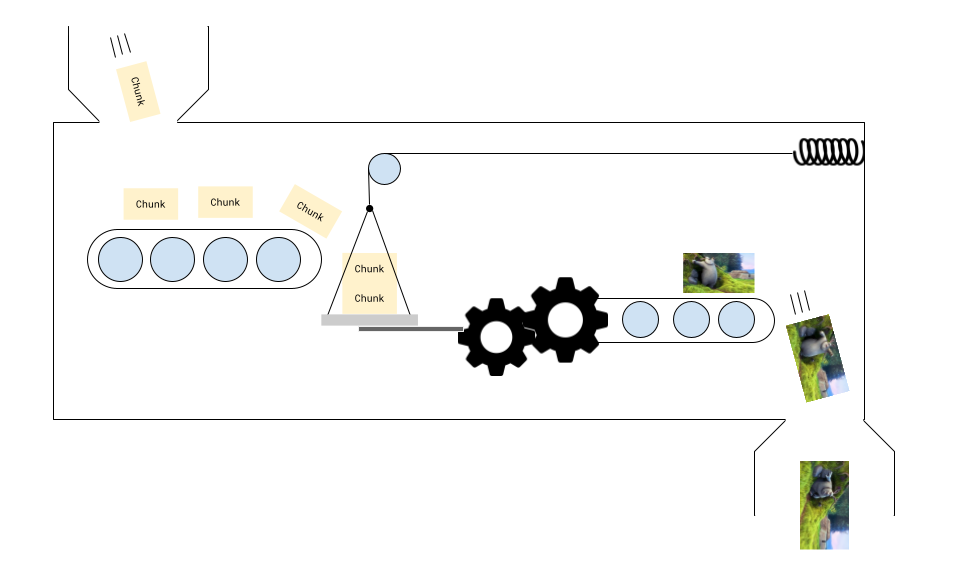
You don’t need to know how it works internally, but you do need to feed a few chunks to get it started, processing is non-linear, and you get frames when you get them.
Warmup chunks
Section titled “Warmup chunks”I’m very much not joking with the contraption analogy. If you set up your decoder and then send 2 chunks for decoding, the decoder may never generate a single frame.
const decoder = new VideoDecoder({    output: function(frame: VideoFrame){        // This will never fire    },    error: function(e: any)=> console.warn(e);});
decoder.configure(/*config*/)decoder.decode(chunks[0]);decoder.decode(chunks[1]);
You may need to send 3 to 5 chunks for decoding before the first rendered frame comes out, and the number of chunks you need to send depends on the device, browser, codec and video.
Remember that some videos include “B” frames where videos are not displayed in the order that they are presented.
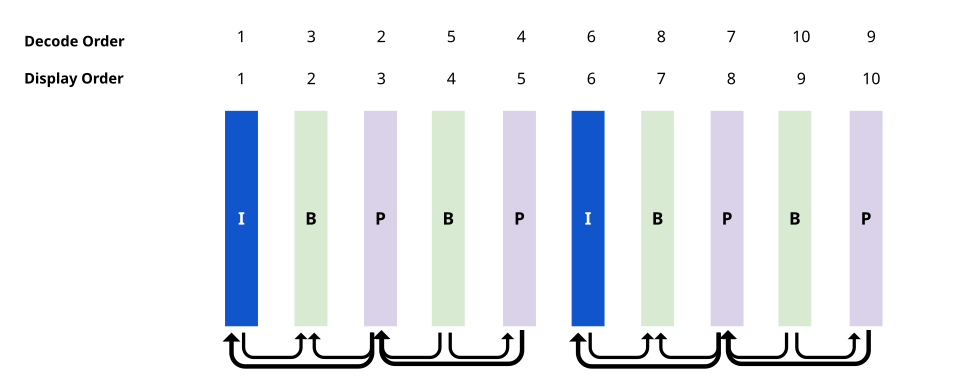
Some graphics cards are also optimized to work in batches of frames. The decoder therefore needs to maintain an internal buffer of frames to do its job properly.
You can imagine it like shoving more chunks into the decoder, it ‘pushes’ the chunks inside the decoder along, and the number of frames rendered sometimes lagging behind the number of chunk sent for decoding because of the complex internal buffer needed to keep the machine running.
Chunks can get stuck
Section titled “Chunks can get stuck”A consequence of this is that frames can sometimes get stuck. If you send all your chunks for decoding, and you have no more ‘chunks’ to push the decoder along, the last few frames may never generate.
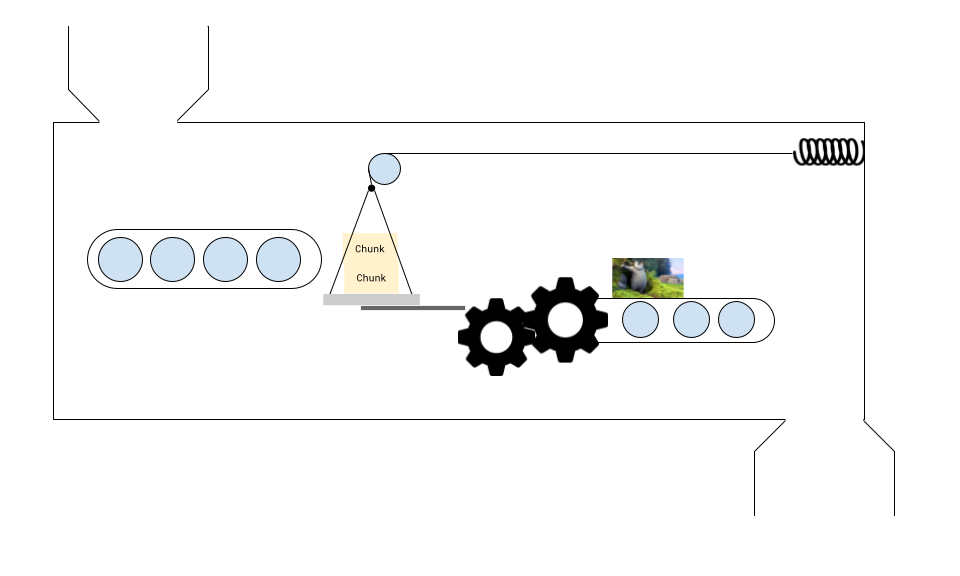
The solution is to call decoder.flush() which will force everything along, with the limitation that when you do this, the next chunk that you send for processing needs to be a key frame (chunk.type === 'key') or the decoder will throw an error.
First frame is always a key frame
Section titled “First frame is always a key frame”Also, just as a quick reminder, every time to configure a VideoDecoder and/or call flush() on a decoder, it “resets” the machine, and you need to feed in a key frame as the first frame, otherwise the VideoDecoder will throw an error.
Pipelines
Section titled “Pipelines”As a consequence, instead of treading decoding as an async task (e.g. for frame of framesInVideo), it’s better to think of decoding as a pipeline, where you will be continuously decoding chunks and generating frames, and you need to track the data flows:
- Where chunks are sent for decoding
- Where frames are generated
- Where frames are consumed
As well as keep track of state (how many chunks have been sent for decoding, how many frames have been generated etc..), and manage memory (the decode queue size, how many frames are in memory).
Decoding Loop
Section titled “Decoding Loop”Let’s move from theory and hello world examples to practical code. Let’s say you just want to play back a 10 minute video in the browser. The hello world examples thus far won’t help because:
- You shouldn’t feed 10 minutes worth of video chunks to the decoder at once
- Decoders work very quickly, so if you render frames as soon as they generate, it will playback at 20x-100x speed.
- If you generate too many frames without closing them, the browser will crash
To simplify, we won’t jump to a full web-codecs video player (covered in Design patterns), but we’ll build up to it. For now let’s simplify:
- Forget about playback control, just play the video back at 30fps
- No audio
- Read all the chunks into memory at init (fine for a 10 minute 360p video).
So we’ll pretend we already have chunks and metadata
const {chunks, config} = await demuxVideo(<File> file);Here are some core concepts we’ll need to start with:
decodeChunkIndex: A variable keeping track of how many chunks have been sent for decoding.
let decodeChunkIndex=0;BATCH_DECODE_SIZE: We will send chunks for decoding in batches. You can set the batch size, if it’s too low (below 5) the decoder might get stuck. If it’s too high, you might run into memory issues. 10 is a safe value.
const BATCH_DECODE_SIZE=10;DECODE_QUEUE_LIMIT: We need to limit the number of chunks being handled by the decoder at a given time, to avoid now overwhelming the decoder. This is not a big risk for the decoder, (this is very much a risk for encoders) but for a production pipeline it’s better to have it than not.
const DECODE_QUEUE_LIMIT=20;fillBuffer(): A function which we will use to send chunks for decoding, which limits the number of chunks sent to the decode size and limits the size of the decode_queue.
function fillBuffer(){
    for(let i=0; i < BATCH_DECODE_SIZE; i++){        if(decodeChunkIndex  < chunks.length){
            if(decoder.decodeQueueSize > DECODE_QUEUE_LIMIT) continue;
            ensureDecoder();
            try{                decoder.decode(decodeChunkIndex);                decodeChunkIndex +=1;
                if(decodeChunkIndex === chunks.length) decoder.flush();            } catch (e) {                console.log(e);            }        }
}}ensureDecoder(): What many hello world guides omit is that the decoder can fail for a variety of reasons during the decoding loop. One common reason is corrupted or missing frames in a video file, so we write a quick utility that skips to the next key frame and attempts to recover the decoding process.
function ensureDecoder(){    if (decoder.state  !== 'configured') {
        if(decoder.state !== 'closed'){            try{              decoder.close();    //Close the old decoder            } catch(e){            }        }
        decoder = setupDecoder();
        for(let j=decodeChunkIndex; j < chunks.length; j++){            if(chunks[j].type === "key"){                decodeChunkIndex = j;                break;            }        }    }}
Render Buffer: We can’t render VideoFrame objects as soon as they are decoded by the decoder, otherwise the video will play back at 20x to 100x speed. We therefore need to store rendered frames in a buffer, and consume frames from the buffer.
const render_buffer = [];lastRenderedTime: For playback and decoder stability, we add a lastRenderedTime which we will use to make sure that we don’t add frames to the frame buffer that are before the current playback position.
let lastRenderedTime = 0;render(time) We will create a render function, which takes a timestamp as as argument. It will then take the latest frame in the render_buffer whose timestamp is less than the render time, and render that. Note that we only call fillBuffer in the render function, because we want to make sure we only add more chunks for decoding (and increase the size of the render buffer) once we have consumed frames from the render buffer.
const canvas = new OffscreenCanvas(config.codedWidth, config.codedHeight);const ctx = canvas.getContext('2d');

render(time: number){
    lastRenderedTime = time;    if(render_buffer.length ===0) return;
    const latest_frame = getLatestFrame(time);
    if(latest_frame < 0) return;

    for(let i=0; i < latest_frame-1; i++){        render_buffer[i].close()    }    render_buffer.splice(0, latest_frame-1); //Drop frames
    const frame_to_render = render_buffer.shift();    ctx.drawImage(frame_to_render, 0, 0);    frame_to_render.close();
    if(render_buffer.length < BATCH_DECODE_SIZE/2) fillBuffer();
}
getLatestFrame(time) We’ll create the utility function mentioned in the render function to get the index of the latest frame in the render_buffer
getLatestFrame(time: number){

    for (let i=0; i < render_buffer.length-1; i++){
        if(render_buffer[i+1].timestamp < render_buffer[i].timestamp){            return i+1;        }    }
    if(render_buffer[0].timestamp/1e6 > time) return -1;
    let latest_frame_buffer_index = 0;
    for (let i=0; i < render_buffer.length; i++){
        if (render_buffer[i].timestamp/1e6 < time &&  render_buffer[i].timestamp > render_buffer[latest_frame_buffer_index].timestamp){            latest_frame_buffer_index = i        }    }
    return latest_frame_buffer_index;


}
decoder It’s only now that we can finally define our decoder, which will take frames than then fill the render buffer. If the frames generated are behind the last rendered time, we need to close them, and fill the buffer as necessary so the decoder can catch up to the playback head. We set this up as a function in case we need to restart the decoder.
function setupDecoder(){
   const newDecoder = new VideoDecoder({        output: function (frame: VideoFrame){
            if(frame.timestamp/1e6 < lastRenderedTime) {                frame.close();                if(render_buffer.length < BATCH_DECODE_SIZE) {                    fillBuffer();                }                return;            }
            render_buffer.push(frame)
        }
        error: function (error: Error){            console.warn(error);        }    });
    newDecoder.configure(config);
    return newDecoder;}
let decoder = setupDecoder();
render loop In the real world, we’d have audio playback dictate the current time of the player, and use that in the argument to the render function. Here for this simple example, we’ll set an interval to run render every 30ms.
function start(){
  const start_time = performance.now();
  fillBuffer();
  setInterval(function(){
    const current_time = (performance.now() - start_time)/1000; //Convert from seconds to milliseconds;
    render(current_time)

  }, 30);

}
Putting this all together, we can finally see an actual video play back at normal speed:
Full source code
<!DOCTYPE html><html lang="en"><head>  <meta charset="UTF-8">  <meta name="viewport" content="width=device-width, initial-scale=1.0">  <title>Decode Loop Demo</title>  <style>    body {      font-family: system-ui, -apple-system, sans-serif;      max-width: 800px;      margin: 40px auto;      padding: 0 20px;    }    canvas {      border: 1px solid #ccc;      display: block;      margin: 20px 0;    }    .controls {      margin: 20px 0;    }    button {      padding: 10px 20px;      font-size: 16px;      cursor: pointer;    }    .stats {      font-family: monospace;      background: #f5f5f5;      padding: 10px;      margin: 10px 0;      border-radius: 4px;    }  </style></head><body>  <h1>Decode Loop Demo</h1>  <p>Implementing the decode loop from the WebCodecs Fundamentals guide - rendering video at 30fps using WebCodecs.</p>
  <div class="controls">    <button id="startBtn">Start Playback</button>    <button id="stopBtn" disabled>Stop</button>    <button id="resetBtn">Reset</button>  </div>
  <canvas id="canvas"></canvas>
  <div class="stats">    <div>Status: <span id="status">Ready</span></div>    <div>Chunks decoded: <span id="chunksDecoded">0</span></div>    <div>Frames rendered: <span id="framesRendered">0</span></div>    <div>Render buffer size: <span id="bufferSize">0</span></div>    <div>Current time: <span id="currentTime">0.00</span>s</div>    <div>Decode queue size: <span id="decodeQueue">0</span></div>  </div>
  <script type="module">    import { WebDemuxer } from 'https://cdn.jsdelivr.net/npm/web-demuxer/+esm';
    const canvas = document.getElementById('canvas');    const ctx = canvas.getContext('2d');    const startBtn = document.getElementById('startBtn');    const stopBtn = document.getElementById('stopBtn');    const resetBtn = document.getElementById('resetBtn');
    // Stats elements    const statusEl = document.getElementById('status');    const chunksDecodedEl = document.getElementById('chunksDecoded');    const framesRenderedEl = document.getElementById('framesRendered');    const bufferSizeEl = document.getElementById('bufferSize');    const currentTimeEl = document.getElementById('currentTime');    const decodeQueueEl = document.getElementById('decodeQueue');
    let chunks = [];    let metaData = null;    let decoder = null;    let renderInterval = null;
    // Decode loop variables    let decodeChunkIndex = 0;    const BATCH_DECODE_SIZE = 10;    const DECODE_QUEUE_LIMIT = 20;    const render_buffer = [];    let lastRenderedTime = 0;    let framesRendered = 0;
    // Initialize demuxer and load video    async function init() {      statusEl.textContent = 'Loading video...';
      const demuxer = new WebDemuxer({        wasmFilePath: "https://cdn.jsdelivr.net/npm/web-demuxer@latest/dist/wasm-files/web-demuxer.wasm",      });
      const response = await fetch('hero-small.webm');      const buffer = await response.arrayBuffer();      const file = new File([buffer], 'hero-small.webm', {type: 'video/webm'});
      await demuxer.load(file);      const mediaInfo = await demuxer.getMediaInfo();      const videoTrack = mediaInfo.streams.filter((s) => s.codec_type_string === 'video')[0];
      // Set canvas dimensions      canvas.width = videoTrack.width;      canvas.height = videoTrack.height;
      metaData = {        codec: videoTrack.codec_string,        width: videoTrack.width,        height: videoTrack.height      };
      // Extract all chunks      statusEl.textContent = 'Extracting chunks...';      chunks = await getChunks(demuxer);

      statusEl.textContent = `Ready - ${chunks.length} chunks loaded`;      startBtn.disabled = false;    }
    async function getChunks(demuxer, start = 0, end = undefined) {      const reader = demuxer.read('video', start, end).getReader();      const chunks = [];
      return new Promise(function(resolve) {        reader.read().then(async function processPacket({ done, value }) {          if (value) chunks.push(value);          if (done) return resolve(chunks);          return reader.read().then(processPacket);        });      });    }
    function fillBuffer() {      for (let i = 0; i < BATCH_DECODE_SIZE; i++) {        if (decodeChunkIndex < chunks.length) {          if (decoder.decodeQueueSize > DECODE_QUEUE_LIMIT) continue;
          try {
            console.log(`Decoding chunk ${decodeChunkIndex}`);
            console.log(`Decoding chunk ${chunks[decodeChunkIndex].type}`);            decoder.decode(chunks[decodeChunkIndex]);            decodeChunkIndex += 1;            chunksDecodedEl.textContent = decodeChunkIndex;
            if (decodeChunkIndex === chunks.length) decoder.flush();          } catch (e) {            console.error(e);          }        }      }    }
    function getLatestFrame(time) {      // Check for out-of-order frames      for (let i = 0; i < render_buffer.length - 1; i++) {        if (render_buffer[i + 1].timestamp < render_buffer[i].timestamp) {          return i + 1;        }      }
      if (render_buffer[0].timestamp / 1e6 > time) return -1;
      let latest_frame_buffer_index = 0;
      for (let i = 0; i < render_buffer.length; i++) {        if (render_buffer[i].timestamp / 1e6 < time &&            render_buffer[i].timestamp > render_buffer[latest_frame_buffer_index].timestamp) {          latest_frame_buffer_index = i;        }      }
      return latest_frame_buffer_index;    }
    function render(time) {      lastRenderedTime = time;      currentTimeEl.textContent = time.toFixed(2);      decodeQueueEl.textContent = decoder.decodeQueueSize;
      if (render_buffer.length === 0) return;
      const latest_frame = getLatestFrame(time);
      if (latest_frame < 0) return;
      // Close and drop old frames      for (let i = 0; i < latest_frame - 1; i++) {        render_buffer[i].close();      }      render_buffer.splice(0, latest_frame - 1);
      const frame_to_render = render_buffer.shift();      ctx.drawImage(frame_to_render, 0, 0);      frame_to_render.close();
      framesRendered++;      framesRenderedEl.textContent = framesRendered;      bufferSizeEl.textContent = render_buffer.length;
      if (render_buffer.length < BATCH_DECODE_SIZE / 2) fillBuffer();    }
    function start() {      statusEl.textContent = 'Playing...';      startBtn.disabled = true;      stopBtn.disabled = false;
      // Reset state      decodeChunkIndex = 0;      lastRenderedTime = 0;      framesRendered = 0;      render_buffer.length = 0;
      // Create decoder      decoder = new VideoDecoder({        output: function(frame) {          if (frame.timestamp / 1e6 < lastRenderedTime) {            frame.close();            if (render_buffer.length < BATCH_DECODE_SIZE) {              fillBuffer();            }            return;          }
          render_buffer.push(frame);          bufferSizeEl.textContent = render_buffer.length;        },        error: function(error) {          console.error(error);          statusEl.textContent = `Error: ${error.message}`;        }      });
      console.log("MEtadata", metaData.codec)      decoder.configure({        codec: metaData.codec      });
      const start_time = performance.now();
      fillBuffer();
      renderInterval = setInterval(function() {        const current_time = (performance.now() - start_time) / 1000;        render(current_time);
        // Stop at end of video        if (decodeChunkIndex >= chunks.length && render_buffer.length === 0) {          stop();          statusEl.textContent = 'Finished';        }      }, 1000 / 30); // 30fps    }
    function stop() {      if (renderInterval) {        clearInterval(renderInterval);        renderInterval = null;      }
      // Close remaining frames      for (const frame of render_buffer) {        frame.close();      }      render_buffer.length = 0;
      if (decoder && decoder.state !== 'closed') {        decoder.close();      }
      startBtn.disabled = false;      stopBtn.disabled = true;      bufferSizeEl.textContent = '0';    }
    startBtn.addEventListener('click', start);    stopBtn.addEventListener('click', stop);    resetBtn.addEventListener('click', () => location.reload());
    // Initialize on load    init().catch(err => {      console.error('Initialization error:', err);      statusEl.textContent = `Error: ${err.message}`;    });  </script></body></html>
If that seems like a lot of code for simple video playback, well, yes. We are working with low level APIs, and by its nature you have lots of control but also lots to manage yourself.
Hopefully this code also communicates the idea of how to think about WebCodecs, as data flow pipelines, with chunks being consumed, frames being generated, buffered then consumed, all while managing memory limits.
Some of this gets easier with libraries like Mediabunny, and later in design patterns, we’ll include full working examples for transcoding, playback and editing that you can copy and modify.