Muxing and Demuxing
As mentioned before, WebCodecs by itself cannot read or write playable video files. You can’t just take a bunch of EncodedVideoChunk objects, put them in a Blob and call it a day.
// This will not work!async function encodeVideo(frames: VideoFrame[]){ const chunks = <EncodedVideoChunk[]>await encodeFrames(<VideoFrame[]> frames); return new Blob(chunks, {type: "video/mp4"}); //Not how this works}To work with actual video files, you need an additional step called Demuxing (to read video files) or Muxing (to write video files).
// Use mediabunny for production, these are just simplified utils for learningimport { getVideoChunks, ExampleMuxer }  from 'webcodecs-utils'
const chunks = <EncodedVideoChunk[]> await getVideoChunks(file);
const muxer = new ExampleMuxer();
for (const chunk of chunks){  muxer.addChunk(chunk);}
const arrayBuffer =  await muxer.finish();
const blob = new Blob([arrayBuffer], {type: 'video/mp4'});
Containers
Section titled “Containers”When a video player reads a video file for playback, it needs more info than just encoded video frames and encoded audio, it needs metadata about the video, such as the tracks, video duration, frame rate, resolution, etc..
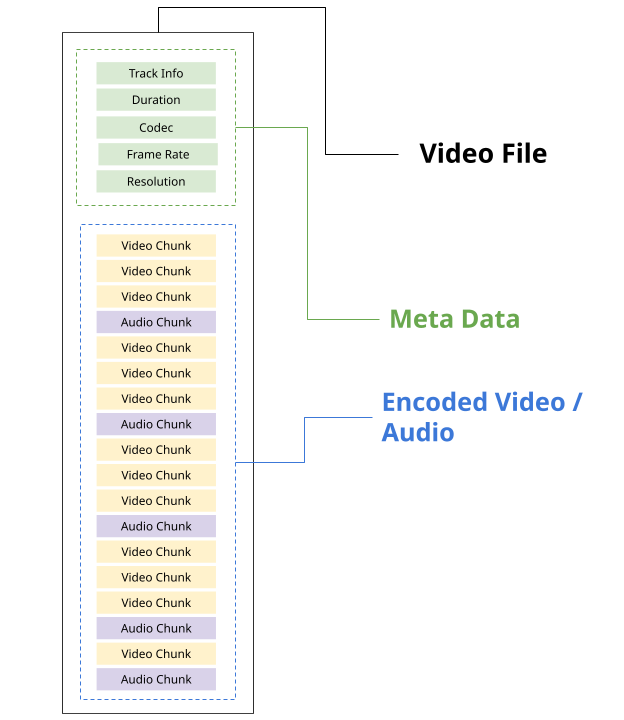
It also needs to have enough info to tell the video player where each encoded chunk is in the source file.
const chunk = new EncodedChunk({ data: file.slice(start, end), //Calculate offsets from metadata //...});Each video file format, such as MP4 and WebM, has its own specification for how to store metadata and audio/video data in a file, as well as how to extract that information.
Storing data into a file (according to the specification) is called muxing, and extracting data from a file (according to the specification) is called demuxing.
The format specifications are complex, and the point of muxing/demuxing libraries is to follow these specifications, so you can read/write video to files without worrying about the details.
In the video world, we call file itself a container and the format (e.g. WebM, MP4) a container format. For the curious, here are the docs for each container format:
Codecs are not containers
Section titled “Codecs are not containers”Containers are different from codecs, which are the compression algorithms for actually encoding/decoding each Video/Audio chunk into raw audio/video.
Containers:
- Provide meta data
- Where in the file to extract individual encoded chunks
Codecs:
- Turn encoded chunks into raw video or audio (and vice versa)
A given container format can actually support video encoded in various different formats, here is a table for the most common containers and video codecs used in browsers:
| Codec | MP4 | WebM |
|---|---|---|
| H.264 | ✅ | ❌ |
| H.265 | ✅ | ❌ |
| VP8 | ❌ | ✅ |
| VP9 | 🟡 | ✅ |
| AV1 | 🟡 | ✅ |
Though as the 🟡 suggests, support depends on the individual video player or encoding software.
Demuxing
Section titled “Demuxing”To read EncodedVideoChunk objects from video file, the easiest way would be to use a demuxing library like Mediabunny, though I’ll present a few different options.
Mediabunny
Section titled “Mediabunny”import { EncodedPacketSink, Input, ALL_FORMATS, BlobSource } from 'mediabunny';
const input = new Input({ formats: ALL_FORMATS, source: new BlobSource(<File> file),});
const videoTrack = await input.getPrimaryVideoTrack();const sink = new EncodedPacketSink(videoTrack);
for await (const packet of sink.packets()) { const chunk = <EncodedVideoChunk> packet.toEncodedVideoChunk();}You’d first import the relevant functions from Mediabunny, and then create an Input reference to a file, extract the VideoTrack.
From there, to read individual source chunks, you could create an EncodedPacketSink, and get packets from the sink, but as we’ll see in the Mediabunny Section, you don’t actually need to touch EncodedVideoChunk directly, the library can handle decoding you can directly go to reading VideoFrame objects without dealing with a VideoDecoder, making Mediabunny by far the most user-friendly option.
web-demuxer
Section titled “web-demuxer”If you want more control and want to manage the VideoDecoder, EncodedVideoChunk objects and file reading process yourself, you can use web-demuxer
import { WebDemuxer } from "web-demuxer";
const demuxer = new WebDemuxer();await demuxer.load(<File> file);
const mediaInfo = await demuxer.getMediaInfo();const videoTrack = mediaInfo.streams.filter((s)=>s.codec_type_string === 'video')[0];

const chunks: EncodedVideoChunk[] = [];
const reader = demuxer.read('video', start, end).getReader();reader.read().then(async function processPacket({ done:boolean, value: EncodedVideoChunk }) {    if(value) chunks.push(value);    if(done) return resolve(chunks);    return reader.read().then(processPacket)});
MP4Demuxer
Section titled “MP4Demuxer”If you want even more control, and are okay with just using MP4 inputs, you can use MP4Demuxer, which is a WebCodecs wrapper around MP4Box.js.
Unlike the other two libraries, MP4Box wasn’t built to integrate with WebCodecs, so I wrote MP4Demuxer to read and extract EncodedVideoChunk and EncodedVideoChunk objects from MP4Box, and MP4Demuxer is what my production apps use (I built it before the previous libraries existed).
Only works for MP4 files (obviously).
import { MP4Demuxer } from 'webcodecs-utils'
const demuxer = new MP4Demuxer(file);await demuxer.load();
const decoderConfig = demuxer.getVideoDecoderConfig();const chunks = await demuxer.extractSegment('video', 0, 30); //First 30 seconds
Manual demuxer
Section titled “Manual demuxer”Don’t build your own demuxer, I’m not your boss, maybe you have some custom use case for manual demuxing. That said, building your own demuxing library is complex and error prone, but if you want to, or if you’re just curious, here’s some guidance.
MP4 Files:
MP4 files store data in the form of ‘boxes’, and there are different types of boxes, like mdat (audio/video data) and moov (metadata) which each contain different types of data, and syntax for storing or parsing that data. Boxes can be nested, and so you’d need to read through a file, separate out all the boxes, and parse the data from each box.
Here is a list of boxes, and you can inspect the source code of MP4Box to see how they parse boxes and how they handle each box type.
I personally don't have much experience with this, but from my initial attempts at manually parsing MP4s in pure Javascript, it is more complex than parsing WebM files.
WebM Files
WebM files use format called Extensible Binary Meta Language, which is like a binary version of XML. You can use an EBML parser to read a WebM file and extract all the EBML elements, which are kind of like XML tags, but they aren’t nested (they just come out as an array) and they can have binary data.
import * as EBML from 'ts-ebml';const decoder = new ebml.Decoder();const arrayBuffer = await file.arrayBuffer();const ebmlElms = decoder.decode(arrayBuffer);You can refer to the official docs for what each Element name is and does, or can just read in a WebM file in a browser and inspect for yourself.
Here is a very barebones example of manually parsing a WebM file purely for illustrative purposes.
Demo WebM Parser (proof of concept)
/**   Demo WebM ParserDo not use this in production or as the basis for production code.This is only for learning purposes and should be treated as pseudocode.**/import * as EBML from 'ts-ebml';
/** * @typedef {Object} VideoTrack * @property {number} trackNumber * @property {string} codecId * @property {'video' | 'audio'} type * @property {Uint8Array} [description] */
/** * @typedef {Object} VIntResult * @property {number} value * @property {number} size */
export class DemoWebMParser {  constructor() {    this.ebmlDecoder = new EBML.Decoder();  }
  /**   * @param {ArrayBuffer} buffer   * @returns {{ tracks: VideoTrack[], videoTrack: VideoTrack | undefined, chunks: EncodedVideoChunk[] }}   */  parse(buffer) {    const ebmlElements = this.ebmlDecoder.decode(buffer);    const tracks = this.getTracks(ebmlElements);    const videoTrack = tracks.find(t => t.type === 'video');    const chunks = this.getVideoChunks(ebmlElements, videoTrack);
    return { tracks, videoTrack, chunks };  }
  /**   * @param {any[]} ebmlElements   * @returns {VideoTrack[]}   */  getTracks(ebmlElements) {    const tracks = [];
    for (let i = 0; i < ebmlElements.length; i++) {      const el = ebmlElements[i];
      if (el.name === 'TrackEntry') {        const track = {};
        for (let j = i + 1; j < ebmlElements.length; j++) {          const trackEl = ebmlElements[j];
          if (trackEl.name === 'TrackEntry') break;
          if (trackEl.name === 'TrackNumber') {            track.trackNumber = trackEl.value;          } else if (trackEl.name === 'CodecID') {            track.codecId = trackEl.value;          } else if (trackEl.name === 'TrackType') {            track.type = trackEl.value === 1 ? 'video' : 'audio';          } else if (trackEl.name === 'CodecPrivate') {            track.description = trackEl.data;          }        }
        if (track.trackNumber) {          tracks.push(track);        }      }    }
    return tracks;  }
  /**   * @param {any[]} ebmlElements   * @param {VideoTrack} track   * @returns {EncodedVideoChunk[]}   */  getVideoChunks(ebmlElements, track) {    const chunks = [];
    for (let i = 0; i < ebmlElements.length; i++) {      const el = ebmlElements[i];
      if (el.name !== 'Cluster') continue;
      let tsEl;      let k;
      for (let j = i; j < ebmlElements.length; j++) {        const elJ = ebmlElements[j];
        if (elJ.name === 'Timestamp') {          tsEl = elJ;          k = j;          break;        }      }
      if (tsEl && k) {        const clusterTimestamp = tsEl.value;
        for (let j = k + 1; j < ebmlElements.length; j++) {          const elJ = ebmlElements[j];
          if (elJ.name !== 'SimpleBlock') break;
          const data = new Uint8Array(elJ.data);          let offset = 0;
          const { value: trackNum, size } = this.readVInt(data, offset);          offset += size;
          const relativeTs = (data[offset] << 8) | data[offset + 1];          offset += 2;
          const flags = data[offset];          offset += 1;
          const isKeyframe = (flags & 0x80) !== 0;          const frameData = data.slice(offset);          const blockTimestamp = relativeTs + clusterTimestamp;
          if (trackNum === track.trackNumber) {            const chunk = new EncodedVideoChunk({              type: isKeyframe ? "key" : "delta",              timestamp: blockTimestamp * 1e3,              data: frameData,              duration: 42 * 1e3 // Hard coded            });
            chunks.push(chunk);          }        }      }    }
    return chunks;  }
  /**   * @param {Uint8Array} data   * @param {number} offset   * @returns {VIntResult}   */  readVInt(data, offset) {    const firstByte = data[offset];
    let size = 1;    let mask = 0x80;    while (size <= 8 && (firstByte & mask) === 0) {      size++;      mask >>= 1;    }
    let value = firstByte & (mask - 1);
    for (let i = 1; i < size; i++) {      value = (value << 8) | data[offset + i];    }
    return { value, size };  }}
Muxing
Section titled “Muxing”To write EncodedVideoChunk objects to a file, you need a muxer. Here the primary option is Mediabunny
Mediabunny
Section titled “Mediabunny”import { EncodedPacket, EncodedVideoPacketSource, BufferTarget, Mp4OutputFormat, Output} from 'mediabunny';
async function muxChunks(function(chunks: EncodedVideoChunk[]): Promise <Blob>{
const output = new Output({ format: new Mp4OutputFormat(), target: new BufferTarget(), });
const source = new EncodedVideoPacketSource('avc'); output.addVideoTrack(source);
await output.start();
for (const chunk of chunks){ source.add(EncodedPacket.fromEncodedChunk(chunk)) }
await output.finalize(); const buffer = <ArrayBuffer> output.target.buffer; return new Blob([buffer], { type: 'video/mp4' });
});Though as with demuxing with Mediabunny, in most cases, you don’t even need to deal with EncodedVideoChunk or VideoEncoder objects, Mediabunny is actually less verbose for writing video frames to a file as we’ll see in the Mediabunny Section.
WebMMuxer/MP4Muxer
Section titled “WebMMuxer/MP4Muxer”If you do want to work directly with EncodedVideoChunk objects, you might consider WebMMuxer and MP4Muxer which are actually from the same author and are deprecated in favor of Mediabunny, but which more directly work with EncodedVideoChunkobjects directly.
import {ArrayBufferTarget,  Muxer} from "mp4-muxer";async function muxChunks(function(chunks: EncodedVideoChunk[]): Promise <Blob>{
    const muxer = new Muxer({        target: new ArrayBufferTarget(),        video: {            codec: 'avc',            width: chunks[0].codedWidth,            height: chunks[0].codedHeight        }    });
    for (const chunk of chunks){        muxer.addVideoChunk(chunk);    }
    await muxer.finalize();    const buffer = <ArrayBuffer> output.target.buffer;    return new Blob([buffer], { type: 'video/mp4' });
});
Manual Muxing
Section titled “Manual Muxing”No
Don’t do it
Just.. No…
See above