
What is WebCodecs?
WebCodecs is a browser API that enables low level control over video encoding and decoding of video files and streams on the client, allowing frontend application developers to manipulate video in the browser on a per-frame basis.
While there are other WebAPIs that work with videos, like the HTML5VideoElement, WebRTC, MediaRecorder and MediaSource APIs, none enable the low-level control that WebCodecs does, which is critical for tasks like Video Editing, Transcoding and high-performance streaming.
At its most fundamental level, the WebCodecs API can boil down to two interfaces that the browser exposes: VideoDecoder and VideoEncoder, which you can use to decode and encode video respectively, as well as two “Data types”: EncodedVideoChunk and VideoFrame, which represent encoded vs raw video data respectively. We’ll get to audio later.
The core API for WebCodecs looks deceptively simple:
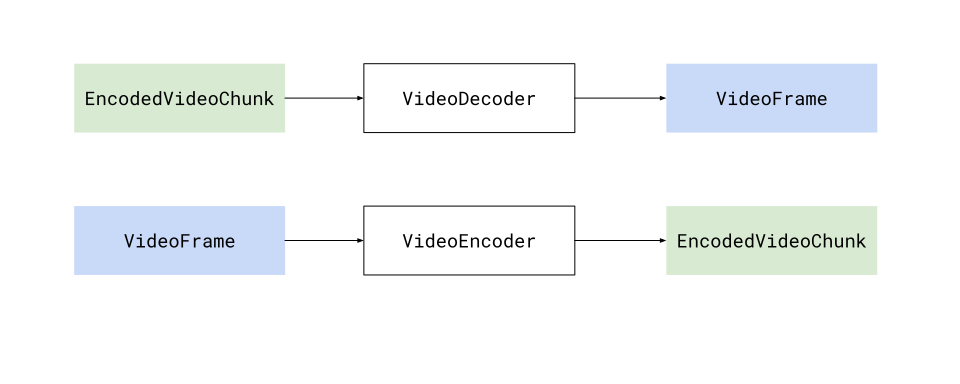
Where the decoder and encoder are just processors that transform EncodedVideoChunk objects into VideoFrame objects and vice versa.
Decoder
Section titled “Decoder”To decode video you would use a VideoDecoder object, which just requires two properties: an output handler (a callback that returns a VideoFrame when it is decoded) and an error handler.
const decoder = new VideoDecoder({ output(frame: VideoFrame) { // Do something with the raw video frame }, error(e) {/* Report an error */}});We need to first configure the decoder
decoder.configure(/* Decoder config, will cover later */)To actually decode video, you would call the decode method, passing your encoded video data in the form of (EncodedVideoChunk) objects, and the decoder would start returning VideoFrame objects in the output handler you defined earlier.
decoder.decode(<EncodedVideoChunk> encodedVideoData);Encoder
Section titled “Encoder”Encoding Video is very similar, but reverses the process. Whereas a VideoDecoder transforms EncodedVideoChunk objects to VideoFrame objects, a VideoEncoder will transform VideoFrame objects to EncodedVideoChunk objects.
const encoder = new VideoEncoder({ output(chunk: EncodedVideoChunk, metaData?: Object) { // Do something with the raw video frame }, error(e) {/* Report an error */}});Again we need to configure the encoder
encoder.configure(/* Encoding settings*/)To actually encode video, you would call the encode method, passing your raw VideoFrame objects, and the encoder would start returning EncodedVideoChunk objects in the output handler you defined earlier.
encoder.encode(<VideoFrame> rawVideoFrame);There’s a lot more to it
Section titled “There’s a lot more to it”So the core of WebCodecs is to expose interfaces around a VideoDecoder and VideoEncoder, and while those classes look simple enough, there’s a lot more to take into account, from basics like working with audio, how to get EncodedVideoChunks objects in the first place, to all the architecture you’d need to create actually build a video player or transcoding pipeline.
So while a hello-world tutorial for WebCodecs can fit in less than 30 lines of code, building a production-level WebCodecs requires a lot more code, a lot more process management and a lot more edge case and error handling.
The rest of this guide is designed to cover those complexities, and close the gap between hello world demos and production-level video processing apps.